Comparison
Make vs n8n vs Zapier for a 5-Person Business: The Same 3 Workflows Built in Each (Costs Included)
Some links below are affiliate links. If you buy through them we may earn a commission at no extra cost to you. How we make money.
Pricing checked October 12, 2026 from zapier.com/pricing, make.com/en/pricing, and n8n.io/pricing.
Most "Make vs Zapier vs n8n" articles compare feature lists. That isn't how small businesses decide. You have a few specific jobs to automate, and you want to know which tool does those jobs cheapest without becoming a second job. So we picked three workflows almost every 5-person service business needs, and we price and build each one in all three tools.
The quick verdict
| Zapier | Make | n8n | |
|---|---|---|---|
| Billing unit | Task = one successful action step | Credit = most module actions use 1 | Execution = one full workflow run, any number of steps |
| Free option | 100 tasks/mo, two-step Zaps only | 1,000 credits/mo | Self-hosted Community Edition (you run the server) |
| Entry paid plan | Pro: $19.99/mo annual, 750 tasks | Core: $9/mo annual ($10.59 monthly), 10,000 credits | Starter: €20/mo annual |
| App connections | 9,000+ apps | "more than 1,000" standard apps | Every integration on all plans; HTTP/code for anything else |
| Learning curve | Easiest | Moderate (visual, more knobs) | Steepest (most technical) |
| Best for | Non-technical owners, low volume, unusual apps | Budget-conscious teams with branching workflows | Multi-step / AI-heavy workflows, technical teams |
Sources: Zapier, Make, n8n, all fetched October 12, 2026.
Make's paid plans (checked on make.com/pricing in a browser, October 12, 2026, at the 10,000-credit tier): Free includes 1,000 credits/month. Core is $9/mo, Pro $16/mo, and Teams $29/mo billed annually, or $10.59, $18.82, and $34.12 billed monthly.
| Make plan (10k credits) | Billed annually | Billed monthly |
|---|---|---|
| Free (1,000 credits) | $0 | $0 |
| Core | $9/mo | $10.59/mo |
| Pro | $16/mo | $18.82/mo |
| Teams | $29/mo | $34.12/mo |
n8n's plans are priced by monthly workflow executions: Starter is €20/mo and Pro €50/mo billed annually, and every plan includes unlimited users and workflows. The execution allowance depends on the tier you choose, so check n8n's pricing page for the current numbers.
Our pick, based on our three builds:
- You want it working this afternoon and run modest volume: Zapier. It was fastest to build for two of the three workflows (about 12 and 21 minutes), but every action inside a loop costs tasks.
- You want the lowest bill and don't need long waits: Make. Core is $9/mo for 10,000 credits, and our three workflows used about 1,300 a month. But its 5-minute run limit ruled out a 2-hour wait in one scenario, and every module costs a credit.
- Your workflows loop, wait, or run many steps, and someone on the team is comfortable with a bit of code: n8n. The invoice sweep was 1 execution for 10 invoices, its Wait node took 2 hours without complaint, and it was the only tool to clean a phone number to digits on the first try.
These picks rest on three builds with test data. None of the three tools sent a real customer email, text, or Slack message in our tests (see each section below).
How each tool charges you (this decides the winner)
Understanding the billing unit matters more than the sticker price.
Zapier: per task. Each successful action step is a task. Triggers, failed steps, and built-in tools (Filter, Formatter, Paths, Delay, Looping, and others) don't count (Zapier). A 4-action workflow costs 4 tasks per run.
Make: per credit. "Each action your scenario performs consumes a certain number of credits — most actions consume 1 credit, while some advanced features leveraging Make's AI Provider may use more." Reading, searching, creating, updating, transforming, aggregating, and iterating data all count. The Router and error-handler modules don't (Make). Important difference from Zapier: in Make, the trigger module that checks for new data also uses credits, so a scenario that polls every few minutes burns credits even when nothing happens. Webhook (instant) triggers avoid that.
n8n: per execution. "An execution is a single run of your entire workflow. It doesn't matter how many steps are in the workflow or how much data it processes" (n8n). A 12-step workflow costs the same as a 2-step one.
What this means in practice: Zapier and Make costs scale with steps × runs; n8n scales with runs only. The more steps per workflow, the more n8n's model helps.
The three workflows
We chose workflows that a 5-person home-services company, agency, or clinic would actually run. Full step-by-step specs are in the downloadable spec sheet.
Workflow 1: New lead → CRM → instant text → team alert
- TRIGGERwebsite form submission (webhook)
- STEP 01check the ZIP code is in your service area
- STEP 02clean up the phone number
- STEP 03create or update the contact in your CRM
- STEP 04send the lead an SMS ("Thanks, we'll call within 15 minutes")
- STEP 05post an alert in Slack
Why it matters: speed of response to inbound leads is widely cited as a driver of conversion; whatever the exact figure, an instant text beats a call-back tomorrow.
| Zapier | Make | n8n | |
|---|---|---|---|
| Billable units per lead | 2 tasks in our build (2 email actions; Tables, Filter, and Formatter don't count) | 5 credits, measured (webhook + 4 modules; the route filter was free) | 1 execution |
| At 150 leads/mo | 300 tasks | 750 credits | 150 executions |
Correction: an earlier version of this article said 3 tasks per lead on Zapier. Our build stored leads in Zapier Tables, which per Zapier's pricing FAQ doesn't use tasks (nor do Filter and Formatter), so only the two email steps bill: 2 tasks per lead. The Zapier count comes from the FAQ, not a live run; see below.
Workflow 2: Job completed → wait → review request
- TRIGGERjob marked complete in your job-management tool or a row added to a sheet
- STEP 01wait 2 hours
- STEP 02send a review-request SMS or email with your Google review link
- STEP 03log that it was sent
| Zapier | Make | n8n | |
|---|---|---|---|
| Billable units per job | 2 tasks if you log to an outside app; 1 task in our build (email only; Delay and Zapier Tables are free per Zapier's FAQ, not yet measured live) | 4 credits (measured: webhook + Sleep + 2 emails) | 1 execution |
| At 120 jobs/mo | 120–240 tasks | ~480 credits | 120 executions |
Workflow 3: Weekly overdue-invoice sweep
- TRIGGERschedule, every Monday 8am
- STEP 01fetch overdue invoices from your accounting tool
- STEP 02for each invoice, send a polite reminder email
- STEP 03post a summary in Slack
This one shows the biggest billing difference, because it loops. If 10 invoices are overdue:
| Zapier | Make | n8n | |
|---|---|---|---|
| Billable units per weekly run (10 invoices) | 20 tasks, measured on the plan counter (our build ran 2 Code steps per invoice inside the loop; a build with the summary after the loop would be ~11–12) | 14 credits, measured (N + 4: parse + iterator + 10 emails + aggregator + summary) | 1 execution, measured |
| Per month (~4.3 runs) | ~86 tasks | ~60 credits | ~4–5 executions |
Total monthly usage for all three
| Zapier | Make | n8n | |
|---|---|---|---|
| Monthly usage | ~506 tasks (300 + 120 + 86) | ~1,290 credits (750 + 480 + 60) | ~275 executions (150 + 120 + ~4–5) |
| Plan needed | Pro 750 tier: $19.99/mo annual, $29.99 monthly (about 240 tasks of headroom; 1,500 tier is $39/mo annual) | Above the 1,000-credit Free plan, so Core: $9/mo annual, $10.59 monthly (10,000 credits) | n8n Cloud Starter €20/mo annual, or free if self-hosted (plus server cost) |
What's measured and what isn't: Make's per-run figures (5, 4, and 14 credits) and n8n's per-run figure (1 execution) are measured. Zapier's Workflow 3 figure (20 tasks) is measured on the account's plan counter, but which steps used those tasks is our inference. Zapier's Workflow 1 and 2 figures (2 and 1 tasks) come from its pricing FAQ, not live runs. Monthly volumes (150 leads, 120 jobs, 10 overdue invoices a week) are assumptions, and our builds swapped real email, SMS, and Slack steps for built-in stand-ins, so a real build may bill a little differently.
How we tested: on October 12, 2026, we built all three workflows in each tool using free or trial accounts. Each tool got the same test record for each workflow: one fake lead, one fake job, and the same list of 10 fake overdue invoices. For each build we recorded (a) the minutes to build it, (b) the tasks, credits, or executions the tool reported, and (c) anything that broke. We didn't connect outside accounts (SMTP, SMS, Slack, a CRM, or accounting software), so those steps used each tool's built-in stand-ins, and we left every workflow switched off afterward.
| Build time | Zapier | Make | n8n |
|---|---|---|---|
| WF1: new lead | ~21 min | ~22 min | ~25 min (approx.) |
| WF2: review request | ~12 min | ~19 min | ~14 min |
| WF3: invoice sweep | ~27 min (incl. publishing and a timezone fix) | ~12 min |
Workflow 1, built for real: what happened
We built the new-lead workflow in all three tools on October 12, 2026, using free or trial accounts and the same test lead (phone "(503) 555-0142", a 97xxx ZIP). We left SMS, Slack, and an outside CRM out to avoid connecting third-party accounts: each tool's built-in storage stood in for the CRM, and built-in email or no-op steps stood in for the text and alert. None of the three workflows was switched on.
WF1 verdict
| Zapier | Make | n8n | |
|---|---|---|---|
| Steps | 6 (1 trigger + 5 actions) | 5 modules + a route filter | 6 nodes (2 are stand-ins) |
| Build time to working test | ~21 min | ~22 min | ~25 min (approximate) |
| Billed per lead | 2 tasks (per Zapier's FAQ; 0 used in testing) | 5 credits (measured) | 1 execution |
| Phone cleaned to digits? | No: formatted only, "(503) 555-0142" | No: the formula got garbled | Yes: "5035550142" |
| Works on the free plan? | No: Webhooks and multi-step need Pro (we used the Pro trial) | Yes, ran on Free | No free Cloud plan (14-day trial) |
| Biggest headache | Formatter can't strip to digits; flaky editor | Typed formulas lose characters | Node-panel test runs stalled |
Make: what happened when we built it
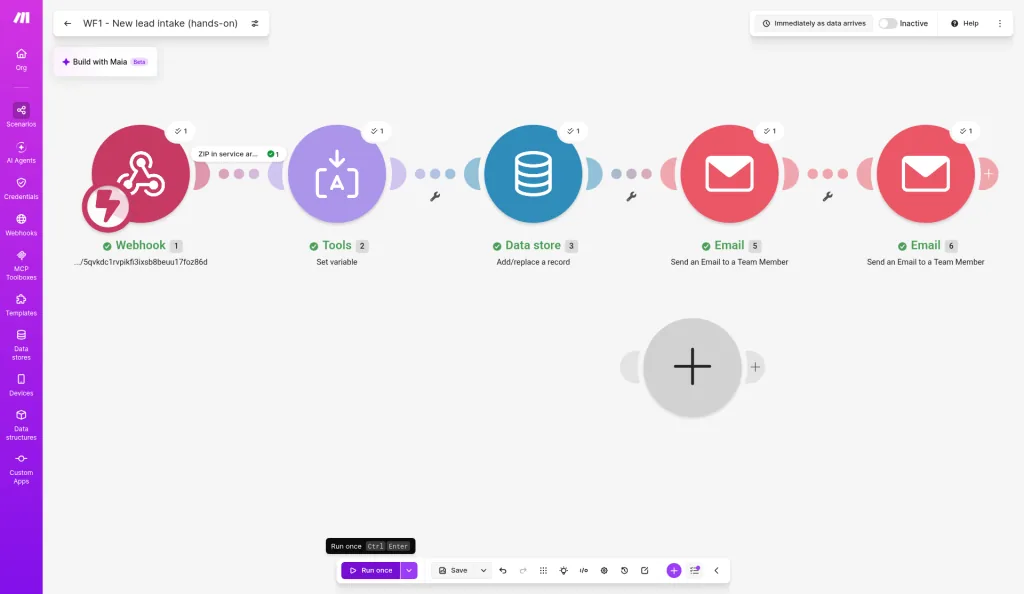
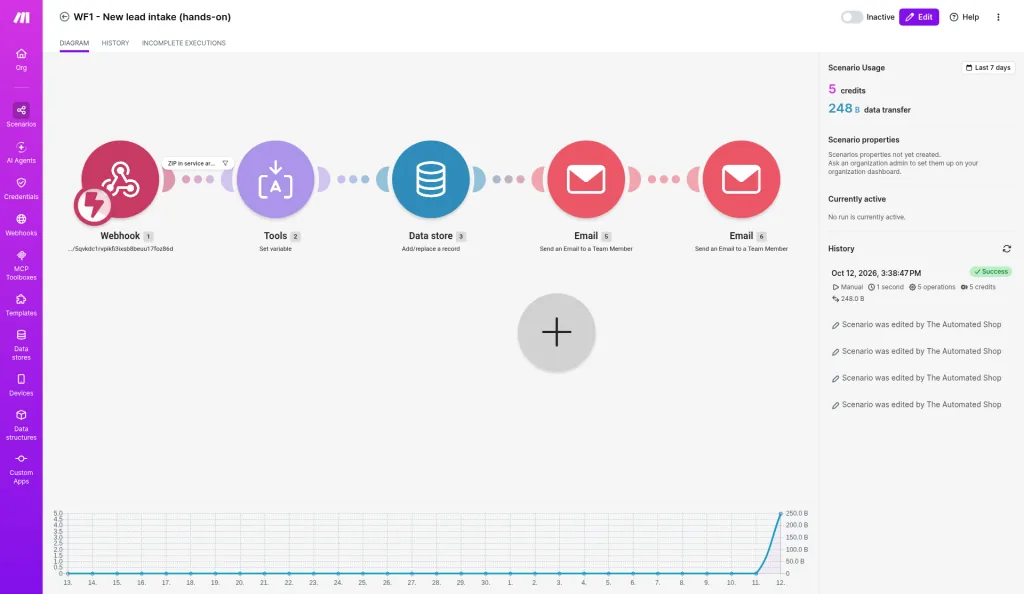
- Steps: 5 modules (Webhook, Set variable, Data store, Email, Email), plus a "ZIP starts with 97" filter on the first link. Filters aren't modules.
- Build time: about 22 minutes from the start to the first successful run (12:16 to 12:38 PT), debugging included.
- Credits used: one run took 1 second and used 5 operations / 5 credits, exactly our estimate. The filter used none. The Free plan counter went from 1,000 to 995.
- Friction:
- Typing formulas into Make's mapping editor garbled them. Our nested
replace()for the phone number lost its "(" characters, so the phone was not cleaned in our run. What worked was clicking the function pills in the picker instead of typing. - Closing the Data store dialog without clicking Save wiped the whole mapping, and the module went back to "Choose a data store."
- Email needs SMTP. Make's general "Send an Email" needs an SMTP connection, so we used "Send an Email to a Team Member," which only sends to the account's own address. We didn't confirm delivery to the mailbox.
- The multi-step scenario with a filter ran fine on the Free plan (which allows 2 active scenarios).
- Typing formulas into Make's mapping editor garbled them. Our nested
n8n: what happened when we built it
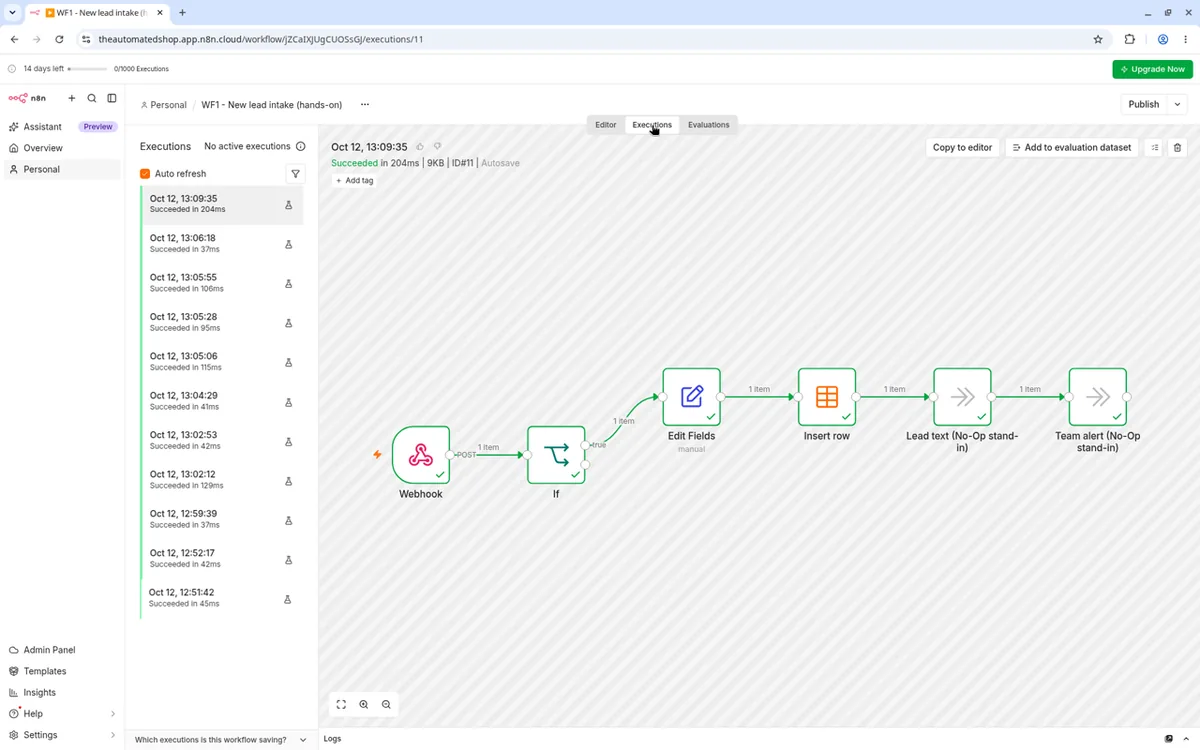
- Steps: 6 nodes: Webhook, If (ZIP starts with 97), Edit Fields, Insert row into an n8n Data table, and two No-Op stand-ins for the lead text and team alert.
- Build time: roughly 25 minutes including debugging (not timed from a start stamp).
- Executions: the successful end-to-end run took 204 ms. n8n bills per execution, so that's 1 per lead. We made 11 execution records while building and debugging. The trial's header counter still read 0/1000.
- What worked: the phone cleanup. A one-line regex,
phone.replace(/\D/g, ''), turned "(503) 555-0142" into 5035550142, the only tool of the three that got digits-only on the first try. - Friction:
- Test runs started from the Webhook node's "Listen for test event" stalled after the If node. Three of them stopped early, wrote nothing, and still reported "Succeeded" with no error. Starting the test from the canvas's "Execute workflow" button (after reloading the editor) ran the full chain with all six nodes green. We didn't pin down exactly why.
- Typing
{{ }}into a field kept it as plain text rather than an expression, and dragging a field in added to the old value instead of replacing it. We had to select all and retype. - Email needs SMTP. n8n's Send Email node needs SMTP credentials, so both notifications are stand-ins here.
- The Data table node defaults to Upsert. We switched it to Insert.
Zapier: what happened when we built it
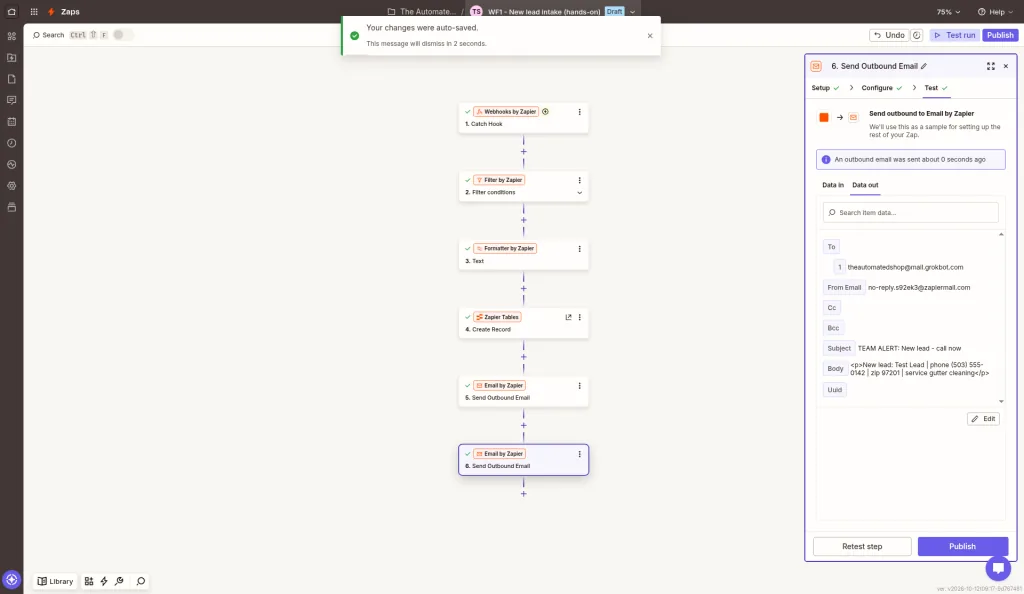
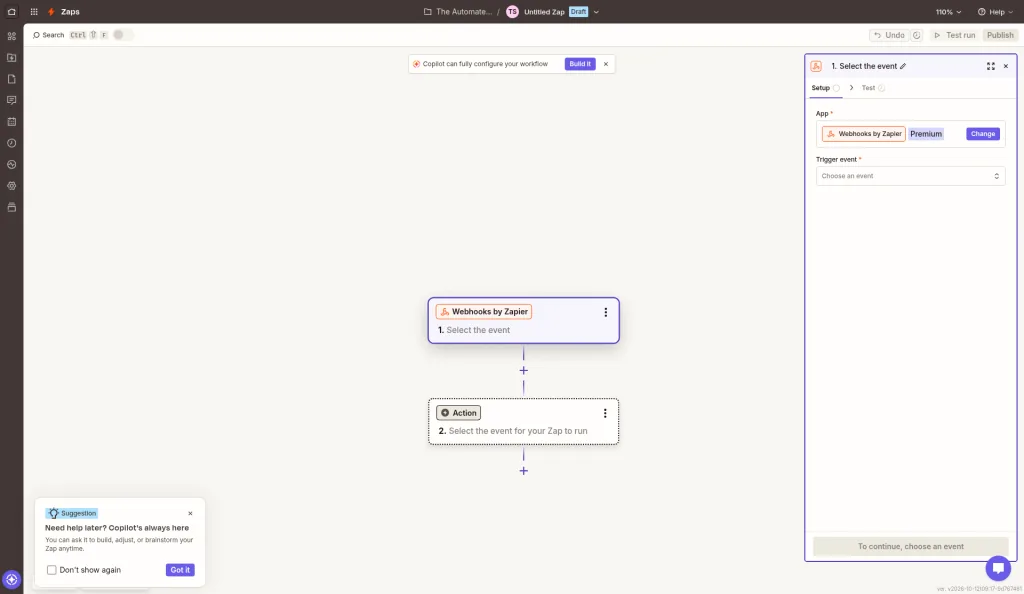
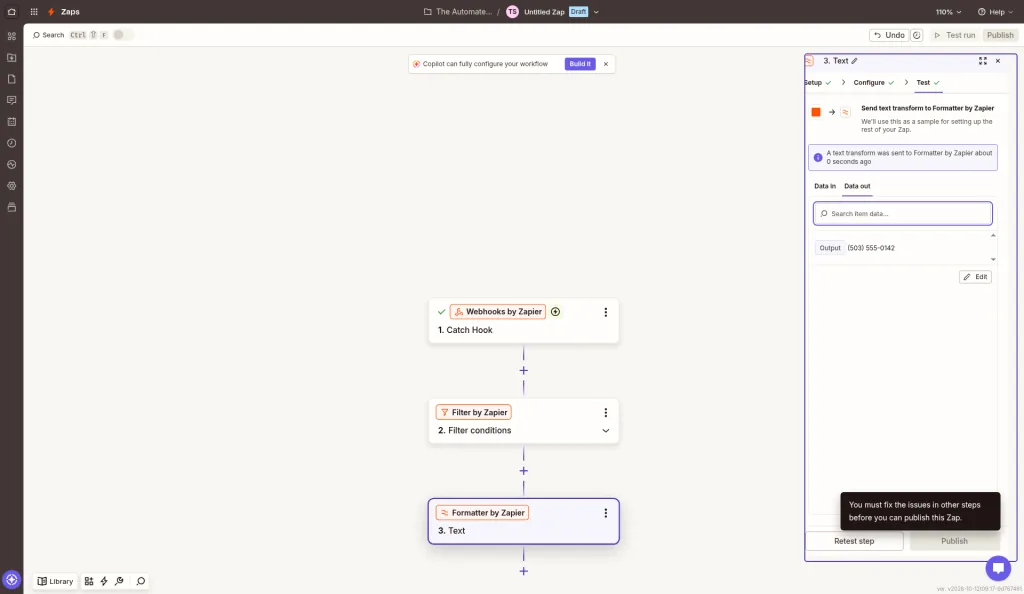
- Steps: 6: Webhooks Catch Hook → Filter (ZIP starts with 97) → Formatter (phone) → Zapier Tables Create Record → Email by Zapier ×2.
- Build time: about 21 minutes (13:11 to about 13:32 PT), including creating the table.
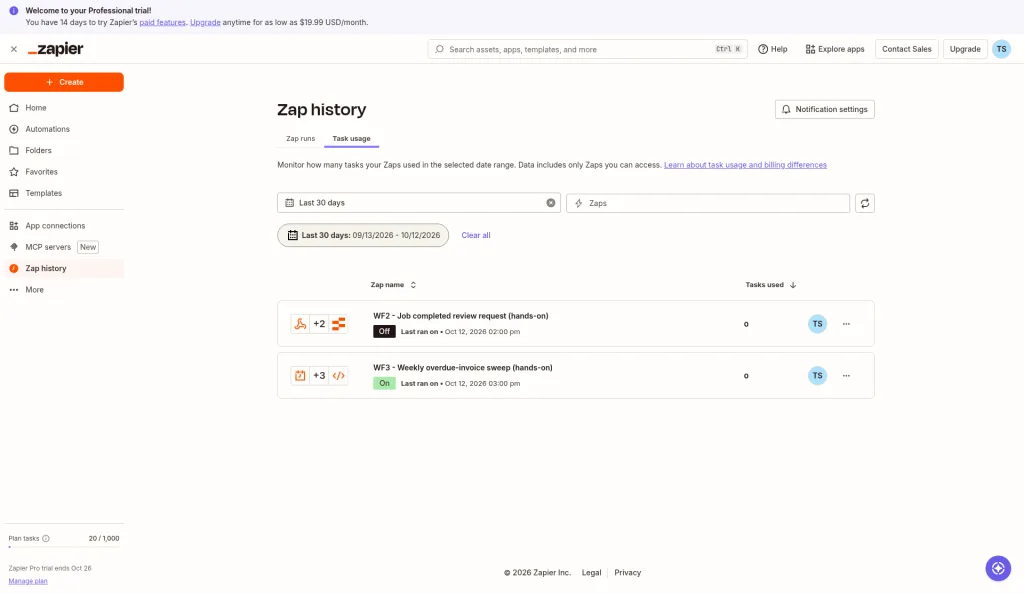
- Tasks: 2 per lead expected. Zapier's pricing FAQ says Zapier Tables, Filter, and Formatter (among others) don't count as tasks, so only the two email steps bill. We tested each step but didn't turn the Zap on, so the account still showed 0 tasks used. The 2-task figure comes from the FAQ, not a live run.
- Friction:
- Not possible on the Free plan. Webhooks carries a "Premium" label, and the pricing page lists Webhooks and multi-step Zaps as Professional features. Free Zaps are two steps only. We built this on the 14-day Pro trial.
- Formatter couldn't strip the phone to digits. "Extract Phone Number" gave back "(503) 555-0142" unchanged, "Extract Number" gave back "503", and spreadsheet formulas failed with "Unknown Function: REGEXREPLACE" (and SUBSTITUTE). We didn't try a four-step Replace chain or a code step.
- Tables must be created first. The Table ID dropdown showed "No options are available" until we made the table at tables.zapier.com, and we had to add each field one at a time.
- The editor was flaky. Text landed in the wrong field once, the panel jumped back to the previous step twice, and "Continue" stayed disabled until focus left the last field. Also, testing a step does it for real: it adds a real row and sends a real email.
- Email cap: Send Outbound Email allows only 5 emails per day on Free or Trial plans (10/hour on paid plans). At 2 emails per lead, that's about 2 leads a day while on the trial.
Workflow 2, built for real: what happened
We built the job-completed workflow in all three tools on October 12, 2026, with the same test job (JOB-1042, a furnace tune-up). Two things are the same in every build, so we'll say them up front: no real customer got an email, and the Google review link is a dummy example.com address. Make and n8n can only email a customer through an SMTP account, and we didn't connect any outside accounts. Zapier's email step sent its test only to our own mailbox. Each tool's built-in storage (or a stand-in) handled the "log it" step.
WF2 verdict
| Zapier | Make | n8n | |
|---|---|---|---|
| Steps | 4 (Catch Hook, Delay For, Email, Tables record) | 4 modules (Webhook, Sleep, Email, Email) | 4 nodes (Webhook, Wait, Edit Fields, Data table insert) |
| Build time | ~12 min | ~19 min | |
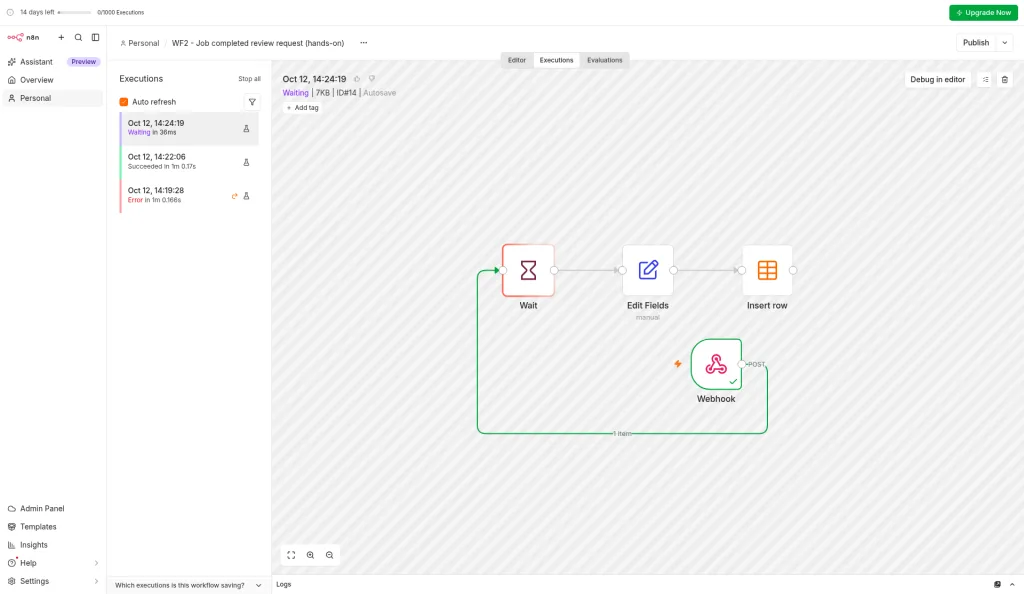
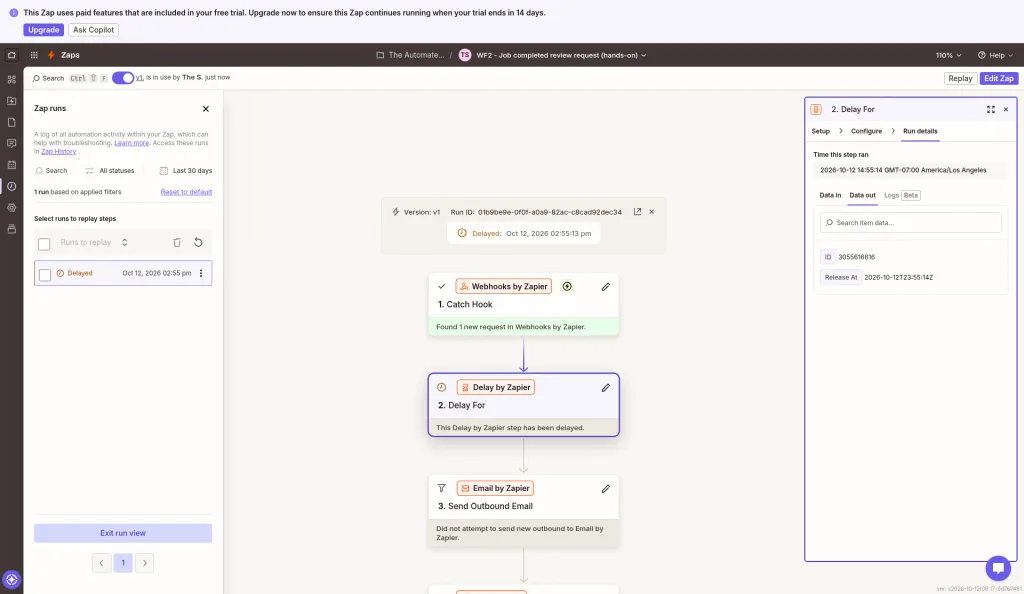
| Can it wait 2 hours? | Yes: Delay For accepts 2 hours, but the editor test skips the wait | No: Sleep is capped at 5 minutes | Yes: Wait accepts 2 hours; the run shows as "Waiting" |
| Billed per job | 1 task expected (email only; estimated, not yet measured live) | 4 credits (measured) | 1 execution |
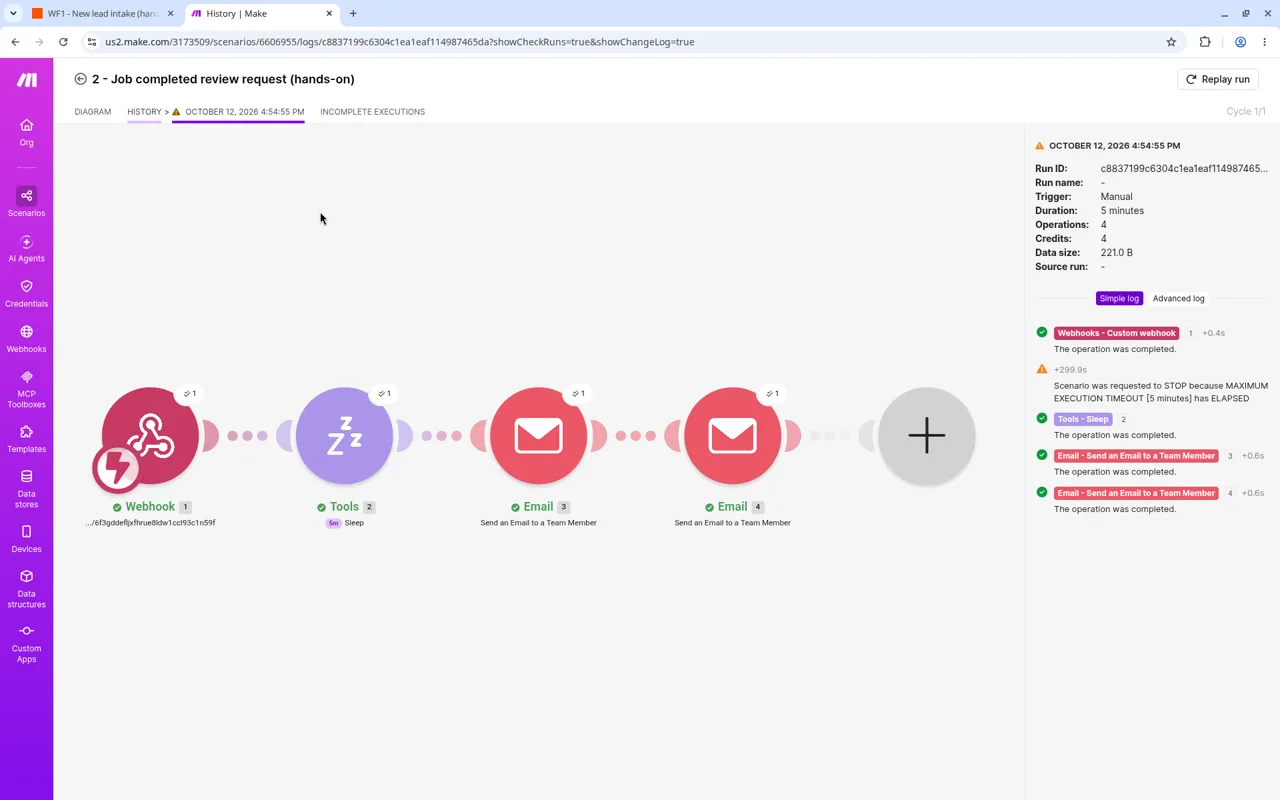
| Run result | Live run sat as "Delayed", release in 2 hours, 0 tasks so far | "Warning": hit the 5-minute run limit | Succeeded (with a 1-minute wait for testing) |
The big difference is the wait. n8n and Zapier both handle "wait 2 hours" in one step. Make can't do it in one scenario on the plan we tested. You'd need a workaround, like queuing jobs and running a second scheduled scenario, which we didn't build.
Make: what happened when we built it
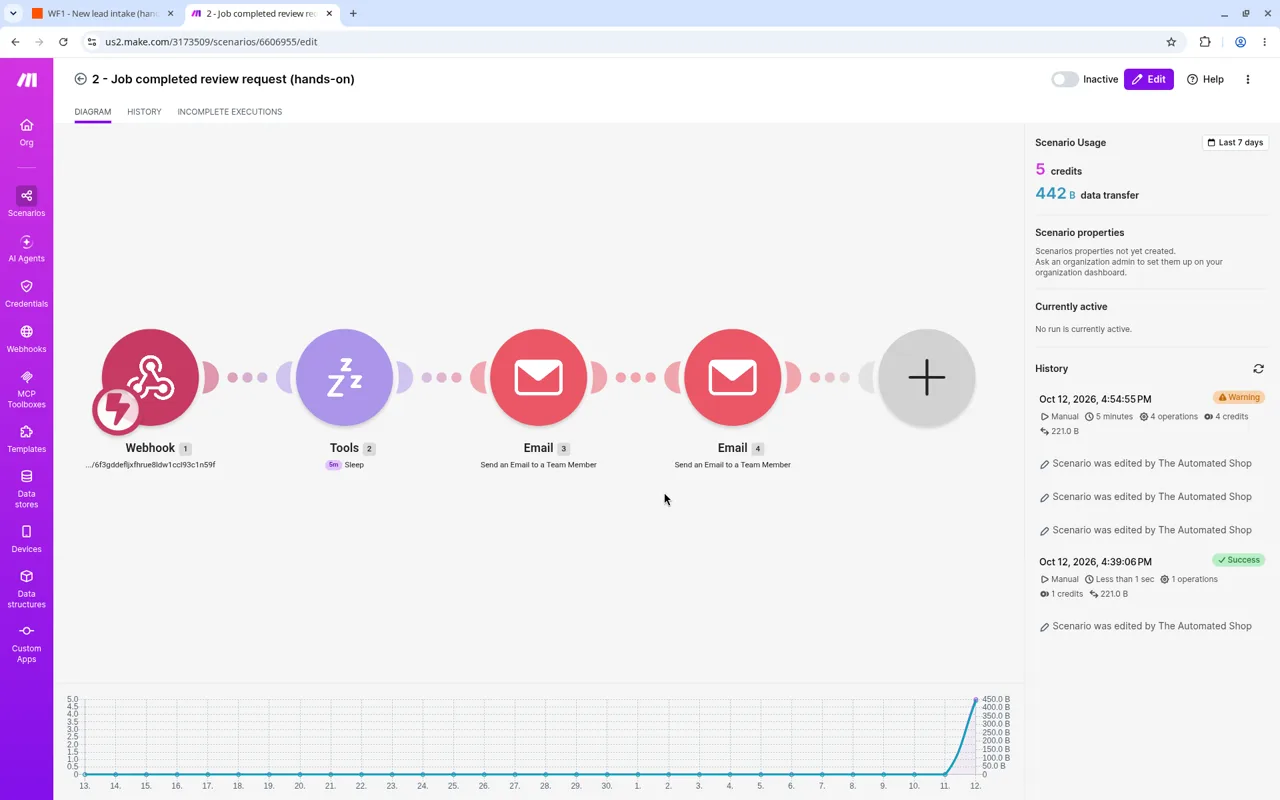
- Steps: 4 modules. Webhook → Sleep (300 seconds, standing in for 2 hours) → "Send an Email to a Team Member" for the review request → a second team email standing in for the log.
- Build time: about 19 minutes (13:35 to 13:54 PT), debugging included.
- Credits used: the full run used 4 operations / 4 credits: 1 each for the webhook, Sleep, and two emails. Sleep counts as an operation, so a delay isn't free on Make. With the earlier test run, WF2 used 5 credits in total.
- Friction:
- 5-minute ceiling. Sleep tops out at 300 seconds, and the run hit Make's "maximum execution timeout [5 minutes]" right as the Sleep ended. Both emails still went out, but Make marked the run Warning, not Success. Read the run log, not just the status icon.
- We couldn't log to a data store. Creating a second data store failed with "Not enough space in storage", even though the first store was nearly empty. Make's pricing FAQ explains why: storage comes at 1 MB per 1,000 credits, and each data store takes at least 1 MB, so the Free plan gets exactly one data store. We used a second team email as the log instead.
- Team emails only. Without SMTP, Make can only email the account's own address, so the review request never reached the customer. Our log email's text says "sent to the customer", which isn't true for this build, and needs fixing before anyone relies on it.
- Typing into Subject and Delay fields dropped characters again, and mapping dialogs sometimes closed without saving.
n8n: what happened when we built it
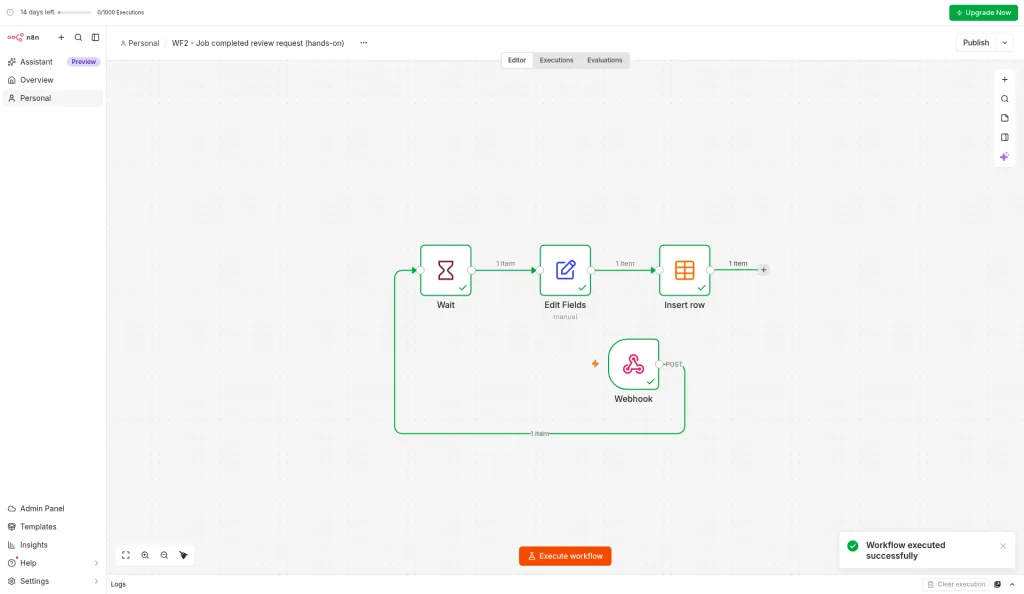
- Steps: 4 nodes. Webhook → Wait (2 hours) → Edit Fields, which writes out the review-request message but doesn't send it (no SMTP) → Insert row into an n8n Data table as the log.
- Build time: about 14 minutes (14:05 to 14:19 PT). About 18 minutes to the first successful run.
- Executions: 1 per job. We made 3 test executions. The trial's counter stayed at 0/1000, so test runs don't seem to count.
- The 2-hour wait: n8n accepted "2 Hours" with no plan warning. A test with the 2-hour setting showed as "Waiting" in the Executions list, so n8n stores the paused run rather than keeping it running. We stopped it after about a minute, so we didn't see it resume after 2 hours. For the full test we shortened the wait to 1 minute, and that run succeeded with every node green.
- Friction:
- "Map Automatically" is strict. Our first run failed at the insert step because two fields had no matching column. n8n rejects the whole row; it doesn't skip the extra fields. Adding the columns fixed it.
- Expressions needed the field's "Expression" switch, and new nodes sometimes landed unconnected. Check the connection lines before you test.
- The log row is honest about the gap: its status column reads "prepared - NOT sent (SMTP not connected)".
Zapier: what happened when we built it
- Steps: 4. Webhooks Catch Hook → Delay For (2 hours) → Send Outbound Email (review request) → Zapier Tables Create Record (log).
- Build time: about 12 minutes (14:30 to about 14:42 PT), the fastest of the three.
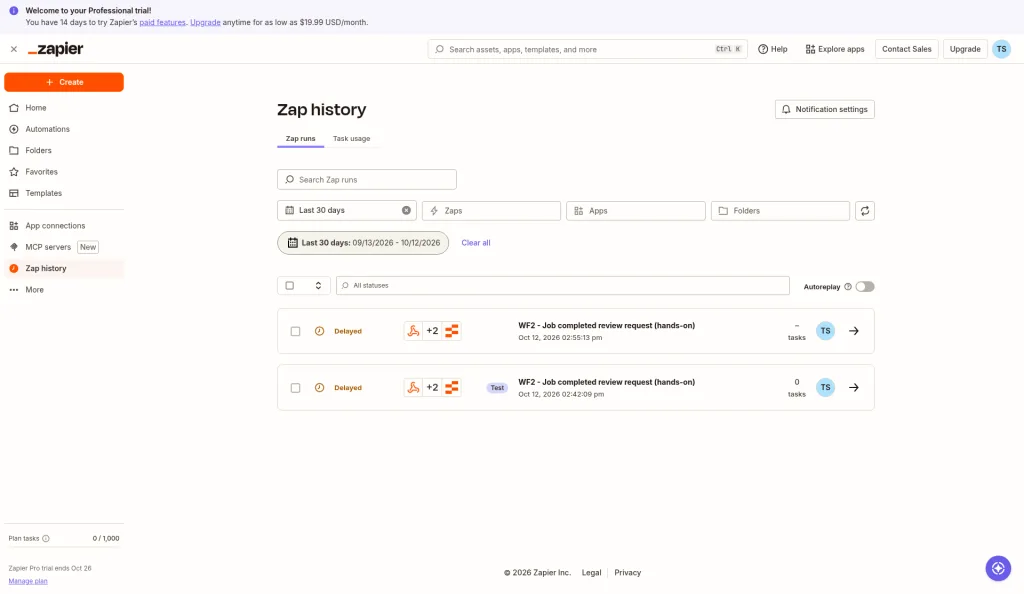
- Tasks: we expect 1 task per job: just the email. Zapier's FAQ says Delay and Tables don't count. That's an estimate, not something we've measured on a live run yet. A live run at 14:55 PT showed as "Delayed", due to release in 2 hours, with 0 tasks used so far. We turned the Zap off afterward.
- Friction:
- The editor test skips the wait. Testing Delay For just shows a "Release At" time 2 hours away and moves on, so you only see the real wait on a live run.
- You must confirm the account email before you can publish. Zapier refused to publish until we confirmed our account email. After that, it published fine.
- Testing a step does it for real. The email test sent a real email (to our own mailbox) and the Tables test added a real row.
- Email cap: the 5-emails-a-day limit on Free and Trial plans applies here too. At 1 email per job, that's 5 jobs a day on the trial.
Workflow 3, built for real: what happened
We built the weekly overdue-invoice sweep on October 12, 2026. Each tool used the same list of 10 fake invoices (INV-2001 to INV-2010, $8,404.20 in total). We didn't connect accounting software, so each build starts from a hard-coded invoice list. No reminder reached a customer and nothing was posted to Slack: Make sent its reminders and summary to our own team mailbox, and n8n and Zapier only prepared the messages.
WF3 verdict
| Zapier | Make | n8n | |
|---|---|---|---|
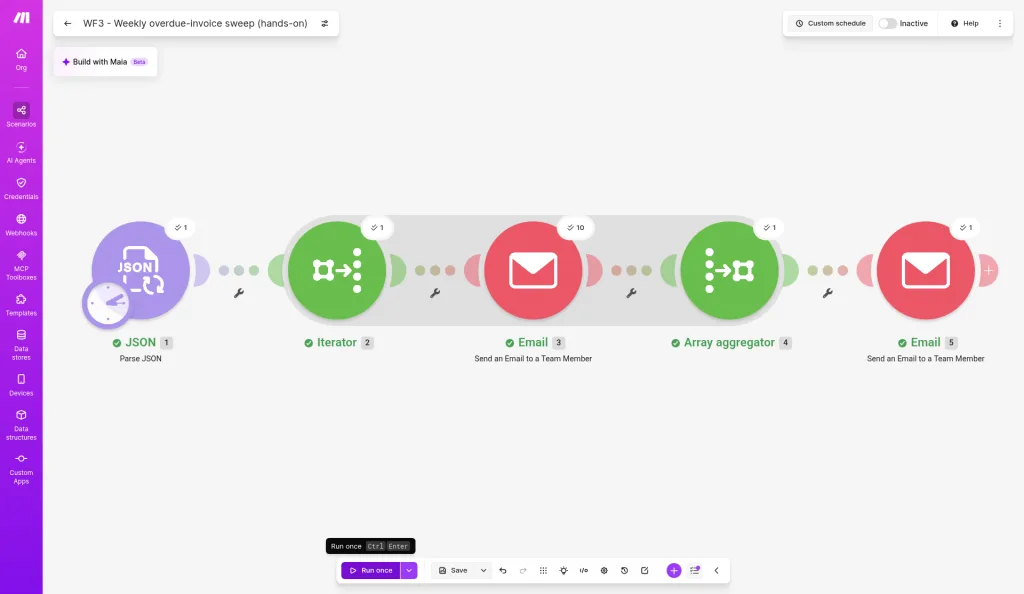
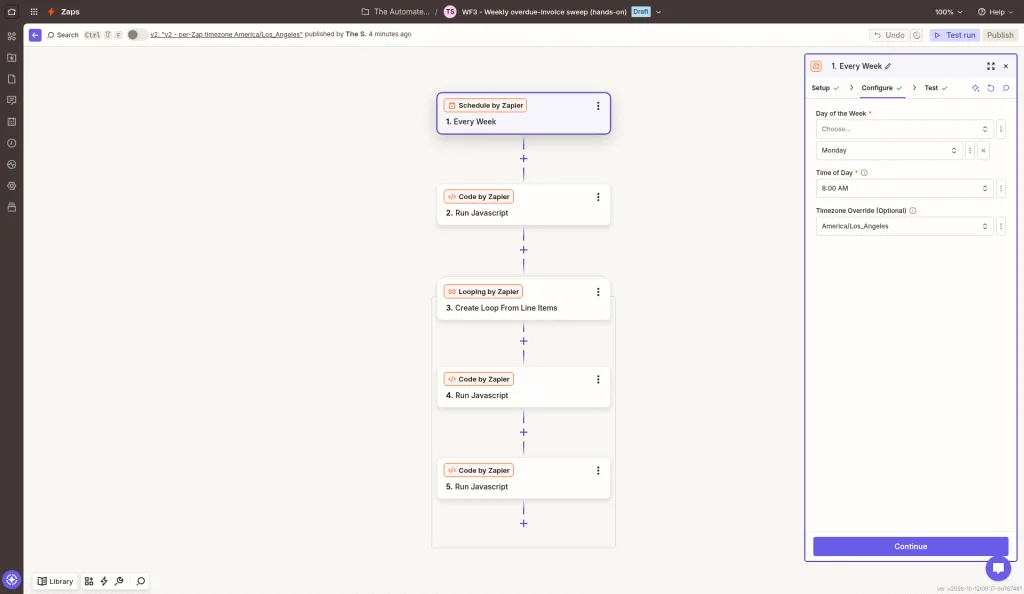
| Steps | 5 (Schedule, Code, Looping, Code, Code) | 5 modules (Parse JSON, Iterator, Email, Array aggregator, Email) | 5 nodes (Schedule, Code, Edit Fields, Aggregate, Edit Fields) |
| Build time | ~27 min (incl. publishing and a timezone fix) | ~12 min | ~8 min to first run; ~12 min incl. a data fix |
| Billed for 10 invoices | 20 tasks (plan counter; split per step inferred) | 14 credits (N + 4) | 1 execution |
| Run time | not measured | 6 s | 1.7 s |
| Loop needed? | Yes: Looping by Zapier | Yes: Iterator, then an aggregator | No: nodes process all 10 items at once |
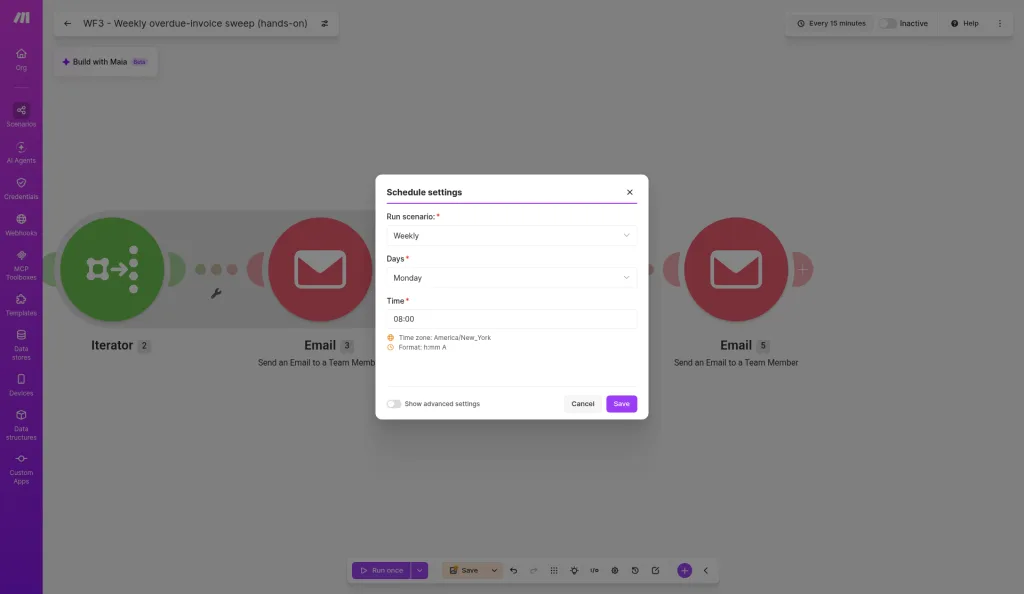
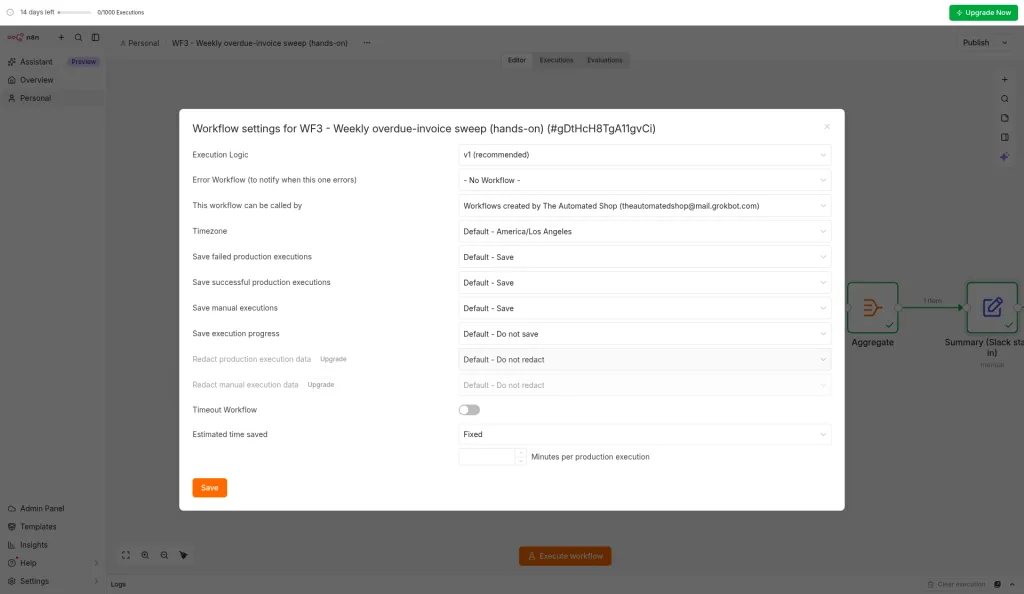
| "Monday 8am" means | UTC unless you set the per-Zap timezone | 8am New York time; no per-scenario zone | Your instance's zone, changeable per workflow |
Two lessons. First, the loop is where the billing models split. n8n charged 1 execution, while Make charged one credit per reminder plus 4 and Zapier charged per step per invoice. Second, check the time zone. On Zapier, a blank timezone setting meant 8am UTC (1am Pacific). On Make, our account's scheduler used New York time with no per-scenario option, so 8am Pacific would have to be entered as 11:00.
Make: what happened when we built it
- Steps: Parse JSON (the invoice list) → Iterator (one bundle per invoice) → "Send an Email to a Team Member" (one reminder per invoice) → Array aggregator → a summary email standing in for Slack.
- Build time: about 12 minutes (14:58 to 15:10 PT). The single run succeeded in 6 seconds.
- Credits: 14 for 10 invoices: 1 parse, 1 for the Iterator (for the whole list, not per item), 10 reminders, 1 aggregator, and 1 summary. That's N + 4, or about 60 credits a month at 10 invoices a week.
- Friction:
- Time zone. The scheduler showed America/New_York and had no per-scenario zone setting, so "Monday 08:00" means 5am Pacific.
- Team emails only (again). Without SMTP, the 10 "reminders" went to our own mailbox. The customer address is in the text but isn't a recipient.
- The aggregator collects the list but doesn't add up the amounts, so our summary has no total. Adding one needs a formula step, which we didn't build.
- Parse JSON fields only show up in later modules once you generate a data structure from a sample. Pressing Escape in a module dialog throws away unsaved changes.
n8n: what happened when we built it
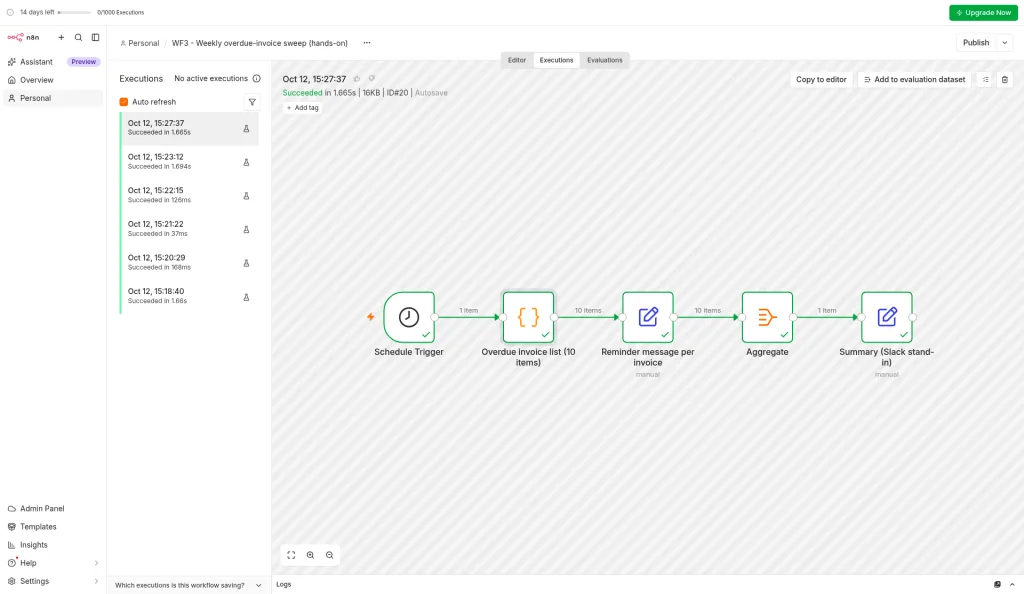
- Steps: Schedule Trigger (weekly, Monday 08:00) → Code (returns the 10 invoices as 10 items) → Edit Fields (builds each reminder) → Aggregate → Edit Fields (builds the Slack summary, including the $8,404.20 total).
- Build time: about 8 minutes to the first successful run. About 12 minutes in total, because our first run used the wrong test data for 4 invoices. We swapped in the exact list used in the other tools and ran it again.
- Executions: 1 execution for all 10 invoices, which took 1.7 seconds, well under the trial's 180-second limit. The trial counter stayed at 0/1000 after test runs.
- No loop node needed. Each node simply handled all 10 items in turn ("1 item → 10 items → 10 items → 1 item"). Split in Batches is only needed for things like rate limits, which we didn't test.
- Time zone: the workflow used the instance default (America/Los_Angeles), and you can change it per workflow in Workflow Settings.
- Stand-ins: without SMTP or Slack, the reminder and summary are prepared but not sent. Their status fields say "NOT sent" and "NOT posted".
Zapier: what happened when we built it
- Steps: Schedule by Zapier (every Monday, 8:00 AM) → Code (the 10 invoices, count and total) → Looping by Zapier (one iteration per invoice) → Code (reminder stand-in) → Code (Slack summary stand-in). We avoided Email by Zapier because 10 reminders would blow through the trial's 5-emails-a-day limit. Real sending needs Gmail or SMTP, and the summary needs Slack connected.
- Build time: about 27 minutes (15:31 to 15:58 PT). That includes publishing it, fixing the time zone, and a replay.
- Tasks: after one full replay with 10 invoices, the plan counter went from 0 to 20 tasks. We think that's the two Code steps × 10 iterations, but Zapier didn't show a per-step split, and the per-Zap figure still read 0 (it seems to lag). Our summary step sat inside the loop. Moved after the loop, it should cost 1 task instead of 10. Test runs used 0 tasks.
- Friction:
- The default time zone is UTC. With the Timezone Override blank, the next run was 8:00 AM UTC. Setting it to America/Los_Angeles on the Zap fixed it (8:00 AM Pacific). Our account profile had no time zone set.
- You can't fire a schedule on demand. Test trigger gives sample weeks. To re-run with real data we used "Replay entire Zap", which counts against your plan's tasks.
- Publishing worked straight away this time, since the account email was already confirmed. We turned the Zap off afterward.
Building it: what each tool feels like
Zapier
Results for all three workflows are above. Fastest to build both times; Delay For handles long waits in one step. Looping by Zapier handled the invoice sweep, but steps inside the loop bill once per item, and schedules default to UTC. We haven't tried any SMS apps yet.
Make
Results for all three workflows are above. Run history shows credits per run clearly, and every module (Sleep included) costs one. The 5-minute run limit rules out long waits inside one scenario. The Iterator plus Array aggregator pattern worked first time for Workflow 3, at 1 credit each plus 1 per item. Scheduling uses the account's time zone (New York in our test). We used webhooks and a manual run, so we didn't measure polling costs.
n8n
Results for all three workflows are above. The Wait node took a 2-hour wait without complaint on the trial. Workflow 3 needed no loop node, ran as one 1.7-second execution, and the time zone can be set per workflow. The trial's limits (n8n says 1,000 executions, 5 concurrent executions, and a 180-second timeout, no card required — n8n) didn't get in the way of any of our tests. Credential setup (SMTP, Slack) is still untested, because we didn't connect outside accounts.
Things the price tables don't tell you
- App coverage. Zapier lists 9,000+ app integrations (Zapier); Make describes "more than 1,000" standard apps plus custom apps for any public API (Make). n8n includes all of its integrations on every plan and lets you call any API with HTTP request or code nodes (n8n). Check your exact CRM, job-management, and accounting tools before choosing.
- Users. Zapier Pro is 1 seat; Team allows 25. n8n plans include unlimited users (n8n). Make's pricing page doesn't list seat limits per plan, so check with Make if several people need to edit scenarios.
- Running out. Zapier can keep running with pay-per-task overage (1.25× base rate annual, 2.5× monthly) or stop (Zapier). Make stops your scenarios until credits are added, queuing incoming webhooks up to your queue limit (Make). n8n says Business and Enterprise workflows keep running and bill overage; its pricing FAQ doesn't spell out what happens on Starter or Pro, so check n8n's pricing page before you rely on it.
- Data location. n8n Cloud stores data in the EU (Frankfurt) (n8n); self-hosting puts it wherever you choose.
- Discounts for small companies. Make's Start-up Plan gives eligible companies under 20 employees 50% off Business (Make). Zapier gives non-profits an extra 15% (Zapier).
Which should you choose?
- Choose Zapier if you're non-technical, run under ~750 tasks a month, or depend on a niche app only Zapier supports. Its 14-day Pro trial needs no card (Zapier).
- Choose Make if you want a visual builder with routers and loops at a lower per-unit price, and you'll take an afternoon to learn it. Start with Make's free plan.
- Choose n8n if your workflows have many steps, you want AI agents inside your automations, or you have someone technical. Try n8n Cloud, or self-host the free Community Edition.
New to the pricing details? Read Zapier pricing explained first.