Pricing
n8n Cloud Pricing Explained (2026): Executions, Plans, and What Actually Counts
Some links below are affiliate links. If you buy through them we may earn a commission at no extra cost to you. How we make money.
Pricing checked October 19, 2026 from n8n.io/pricing, which listed prices in euros when we checked. Counting rules from n8n's docs page Understand executions and the Help Center article Can you reset my executions?. n8n changes pricing; check the live page before you buy.
n8n Cloud has one billing unit: the execution, meaning one production run of a workflow. Steps don't matter, and neither does the number of items a run handles. That makes n8n the cheapest of the three big tools for workflows that loop or have many steps, and easy to overpay on if your trigger fires on everything.
We didn't want to rely on the pricing page alone. On October 19 we published our lead-intake workflow on an n8n Cloud trial, sent it six real webhook requests, and watched the execution counter.
Short version:
- Plans (billed annually / monthly): Starter €20 / €24 a month for 2,500 executions, Pro €50 / €60 for 10,000, Pro €1,450 a year / €145 a month for 50,000, and Business €667 / €800 for 40,000.
- Six webhook requests counted as six executions, including two that our If node filtered out on the first step. A run that does nothing useful still uses up your allowance.
- Ten invoices in one run = one execution. In Make the same sweep used 14 credits.
- Whether failed runs count is unclear. n8n's own docs and Help Center point different ways, and none of our test runs failed, so we couldn't settle it.
- Our three measured workflows come to roughly 275 executions a month, about 11% of Starter's allowance.
The plans
| Plan | Billed annually | Billed monthly | Executions / month | Concurrent runs |
|---|---|---|---|---|
| Trial | Free, no card | — | 1,000 | 5 |
| Starter | €20/mo (€240/yr) | €24/mo | 2,500 | 5 |
| Pro (10k) | €50/mo (€600/yr) | €60/mo | 10,000 | 20 |
| Pro (50k) | €1,450/yr | €145/mo | 50,000 | 50 |
| Business | €667/mo (€8,000/yr) | €800/mo | 40,000 | — |
Source: n8n.io/pricing, checked October 19, 2026. Business overage is listed at €4,000 per extra 300,000 executions. The trial also has a 180-second timeout per run. n8n's Help Center calls the two Pro tiers "Pro-1" and "Pro-2". We saw euro prices; we haven't confirmed whether US visitors see dollars at checkout.
Every plan comes with unlimited users and workflows, so you aren't paying per seat. The two numbers that matter are executions per month and concurrency, meaning how many runs can happen at the same moment. On Starter, a sixth run that starts while five are still going waits in a queue, and it does run once a slot frees up (Help Center). For a small business, that only matters if long-running workflows pile up. Our Wait-based review request is the obvious example.
What counts as an execution
From n8n's Understand executions page:
Counts:
- Production runs: anything started by a trigger, schedule, or poll on a published workflow.
- Webhook triggers: "one execution for every inbound request that activates the trigger," including requests with an empty body (
{}). - Schedule triggers: one execution "every time the node fires, regardless of outcome."
- Polling triggers: only when new data is found.
Doesn't count:
- Manual runs from the editor while you build and test.
- Sub-workflows called with Execute Sub-workflow (only the parent counts).
- Runs of a workflow set as an error workflow.
- Polls that find nothing.
- Malformed webhook requests that fail before the workflow starts.
Allowances reset at the start of each calendar month, whatever your billing date. If you run out, n8n doesn't queue anything. Each new run fails straight away with "Execution limit reached. Consider upgrading your plan" and stays failed, even after the reset. You'd have to re-run each one by hand. Trial, Starter, and Pro-1 customers can ask for a one-time courtesy reset (Help Center).
That's the worst thing about n8n's billing. For a lead form, it means leads that arrive after you hit the limit are lost unless you go back and replay them. Size your plan with real headroom.
What we measured: six requests, six executions
The setup: our Workflow 1 from the Make vs n8n vs Zapier comparison, with Webhook → If (ZIP starts with 97) → Edit Fields (clean the phone number) → Insert row → two stand-in steps for the lead text and team alert. We published it, which is what makes runs count, and sent six requests between 9:47:14 and 9:47:32 a.m. PT on October 19.
| Request | What we sent | What happened | Counted? |
|---|---|---|---|
| A1–A3 | Three valid leads (ZIPs 97201–97203) | Full path, row stored, 111–261 ms | Yes, 3 |
| B | Out-of-area lead (ZIP 10001) | If took the false branch. Nothing ran after it (47 ms) | Yes |
| C | Empty body {} |
If found no ZIP. Nothing ran after it (64 ms) | Yes |
| D | In-area lead with no phone number | We expected an error. n8n set the cleaned phone to empty and stored the row (114 ms) | Yes |
The counter read 0/1000 before and 6/1000 after. All six runs show as Succeeded in the executions list.

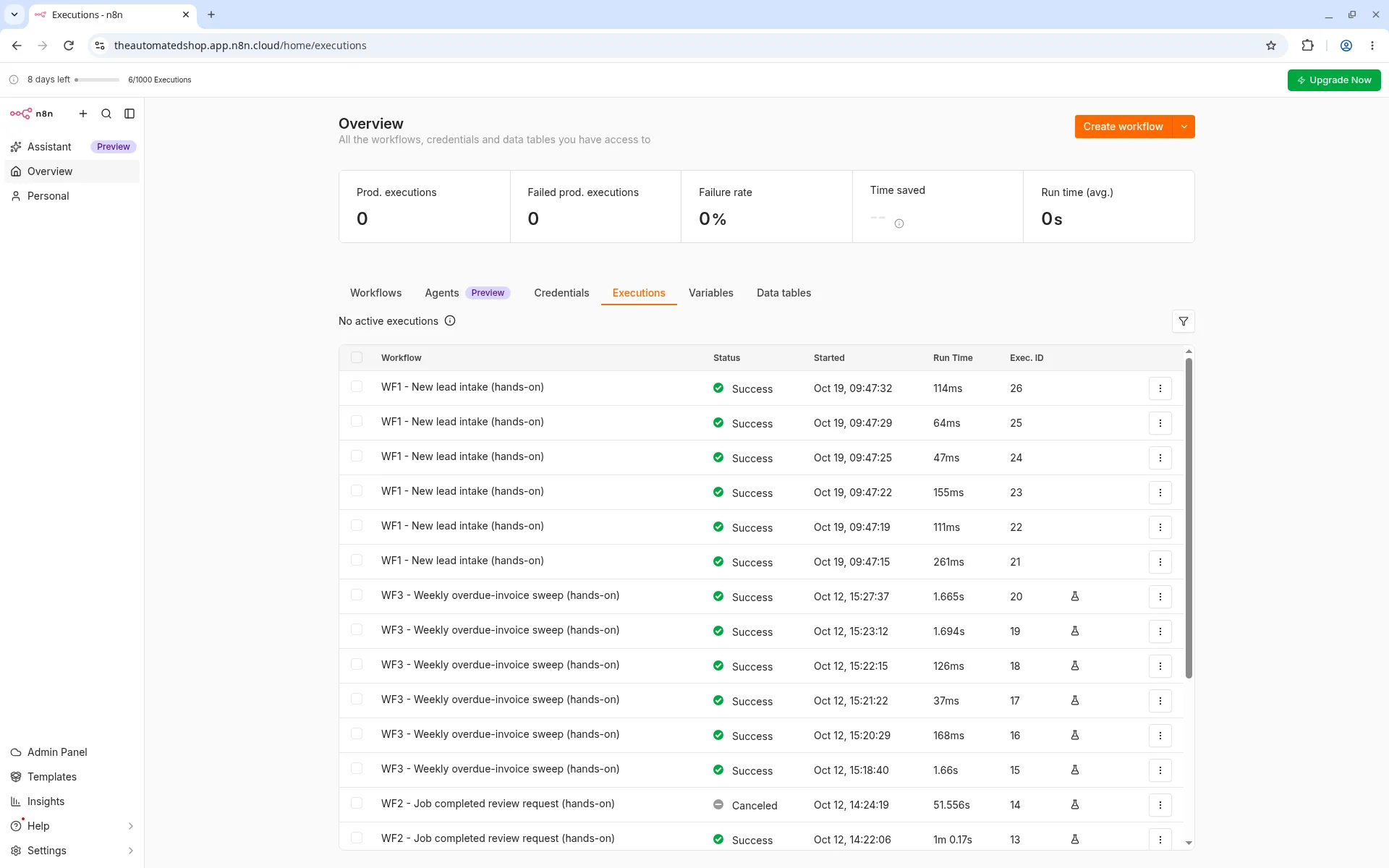
What that means for you: an If node at the start of a workflow doesn't save you anything. If a contact form gets 1,000 spam submissions and you filter them out on the first step, that's still 1,000 executions. Block junk before it reaches n8n: a honeypot field or CAPTCHA on the form, or a narrower trigger in the source app. Don't rely on filtering after the webhook.
Make bills this differently. Its link filters cost 0 credits, so a filtered lead in Make costs only the trigger's credit (our Make pricing guide).
The open question: do failed runs count?
We don't know, and n8n's own pages don't agree:
- The Help Center says plainly: "Failed executions do not count against your execution quota."
- The docs say schedule triggers count "every time the node fires, regardless of outcome," and webhook triggers count every request that activates the trigger. The only exception they list is malformed requests "that fail before the workflow starts."
Request D was meant to fail and didn't, so our test couldn't settle this. We won't guess. If you have a workflow that errors often, keep an eye on the counter for a few days, or ask n8n support before relying on either answer.
Loops are where n8n saves money
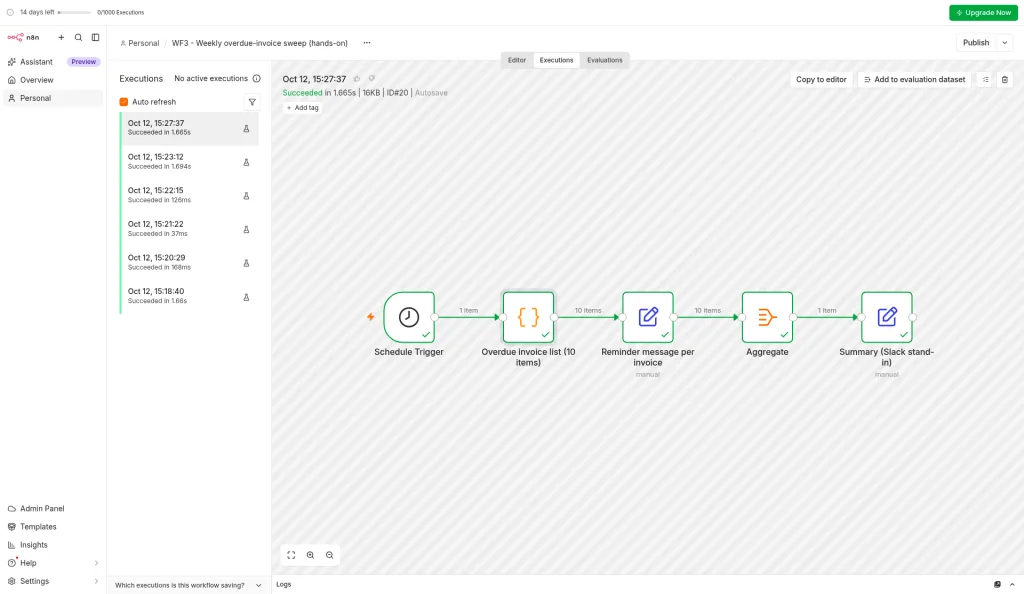
On October 12 we built a weekly overdue-invoice sweep in all three tools: one run that sends 10 reminders and a summary. In n8n, all 10 items went through each node in a single run, with no loop node. The run took 1.665 seconds and counted as 1 execution. Make billed 14 credits for the same run, and Zapier's counter showed 20 tasks.
The same goes for long waits. Our review-request workflow holds a job in a 2-hour Wait inside one run. Make's runs are capped at 5 minutes, so it can't do this at all. In n8n the wait happens inside one run, and n8n's docs count one execution per webhook request, so that's one execution per job.
Worked example: our three workflows, one month
Volumes are the same assumptions we used for Make and Zapier: a 5-person home-services business.
| Workflow | Trigger | Assumed volume | Executions / month |
|---|---|---|---|
| New lead intake | Webhook | 150 leads (plus any junk that hits the form) | 150 |
| Review request (2-hour wait) | Webhook | 120 completed jobs | 120 |
| Weekly invoice sweep | Schedule, Mondays | 4–5 Mondays | 4–5 |
| Total | ~275 |
That's about 11% of Starter's 2,500, so Starter at €20/mo annual covers it with room for 9× growth. For comparison, the same three workflows came to about 1,290 Make credits (Core, $9/mo annual) and needed Zapier's Pro 750-task tier ($19.99/mo annual), per our comparison.
Make is cheaper in raw sticker price for this load. n8n's advantage grows with every step and every item per run. Make's bill goes up each time you add a step or an invoice, and n8n's doesn't.
Where it breaks: at 10× our volumes (1,500 leads, 1,200 jobs) you'd be at roughly 2,750 executions, just over Starter. That's Pro at €50/mo annual.
Which plan fits which business
- Solo operator or 2–10 person service business with a few workflows: Starter. Count your webhook traffic honestly, including spam. If you're under about 1,500 runs a month, you have a buffer for a bad month.
- Busy lead flow, several locations, or anything event-driven per order: Pro (10k). You get four times the executions and 20 concurrent runs, which matters if you use Waits.
- E-commerce or high-volume webhooks (every order, every form view): Pro (50k). Or reconsider whether every event needs to trigger a run at all.
- Business plan: at €667/mo annual it includes fewer executions than Pro 50k (40,000 vs 50,000). A small business shouldn't buy it for executions.
- Comfortable running a server: n8n's Community Edition is free to self-host and has no execution quota. You pay for hosting and your own time. We haven't priced that yet.
Our pick: for most small businesses whose workflows have more than four or five steps or loop over lists, n8n Starter is the best value of the three tools, as long as you block junk before it reaches a webhook. If your automations are short and linear, Make Core costs less. If nobody on the team wants to touch expressions, Zapier is easier.
FAQ
Does n8n Cloud have a free plan? There's a free trial with 1,000 executions and no card required. The rendered pricing page we checked didn't list a permanent free Cloud plan. The self-hosted Community Edition is free.
Do test runs in the editor count? No. Manual executions don't count (docs). During our earlier manual test runs, the trial counter stayed at 0.
Do filtered-out runs count? Yes. We measured it: two requests stopped at the If node and each counted as one execution.
Does a 10-step workflow cost more than a 2-step one? No. Both are one execution per run.
When does my allowance reset? On the 1st of each calendar month, not your billing date (Help Center).
Does The Automated Shop earn a commission if I subscribe to n8n? We may join n8n's affiliate program later. Until a tracking link is live, links on this page go to n8n's official site with no referral tag. See our affiliate disclosure.