How-to
n8n Error Alerts: Get Told When a Workflow Fails (Tested, 2026)
Some links below are affiliate links. If you buy through them we may earn a commission at no extra cost to you. How we make money.
Tested November 1, 2026 on n8n 2.44.6 Community Edition, running on our own test server. Setup steps follow n8n's docs on error handling and the Error Trigger node. The alert format follows Slack's guide to incoming webhooks. n8n changes quickly, so check the docs for your version.
When an n8n workflow fails, nobody is told by default. The failed run sits in the Executions list until someone happens to look. For a lead form or an order sync, that can mean a customer waits for days.
n8n's fix is an error workflow: a separate workflow that runs whenever another workflow fails. We set one up on a lead-intake workflow, then broke it on purpose 46 times to see what really happens.
Short version:
- Publish the error workflow, or it never runs. n8n's docs say an Error Trigger workflow doesn't need to be published. On 2.44.6 it does. Our unpublished error workflow sent 0 alerts for 14 failures, and the only trace was a line in the server log.
- Once it's published, alerts are instant. Each alert reached our receiver about 0.1 seconds after the lead arrived.
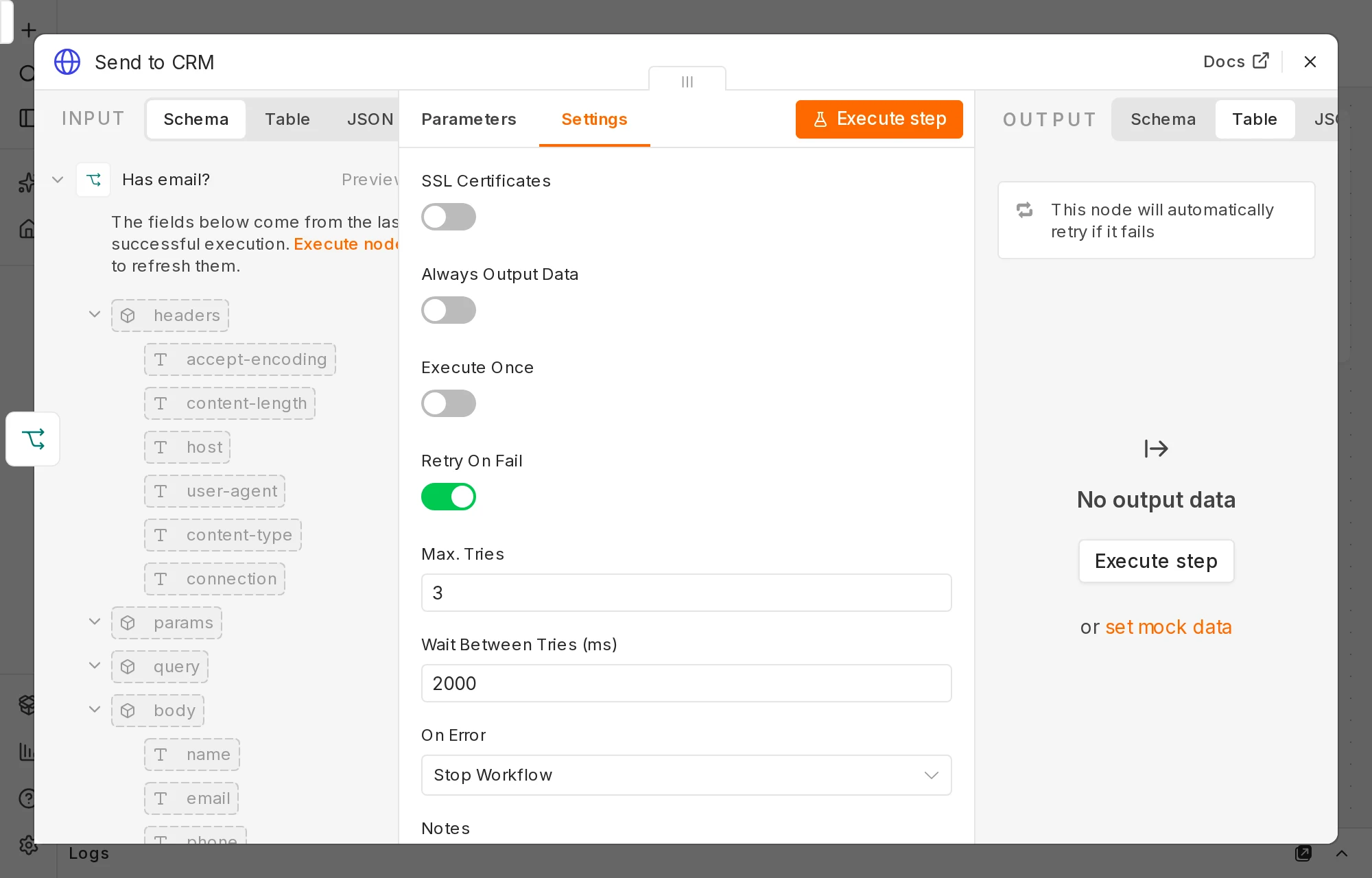
- Turn on Retry On Fail for every step that calls another app. With 3 tries and a 2-second wait, a CRM that failed twice in a row still got the lead on the third try, 4 seconds later, and nobody was paged. Without it, one brief failure lost the lead and sent an alert.
- One outage means one alert per failed run. Ten leads during a CRM outage gave us ten alerts in under half a second. A five-line Code node cut that to two (more on why it was two, not one, below).
- The person filling in your form never knows. n8n answered every test with HTTP 200 "Workflow was started", including the runs that failed. The alert is the only way you'll find out.
What we built
The workflow being watched is a typical lead intake: a Webhook receives a form submission, an If node checks it has an email address, and an HTTP Request node sends it to the CRM. Leads without an email go to a Stop and Error node, which fails the run on purpose with our own message.
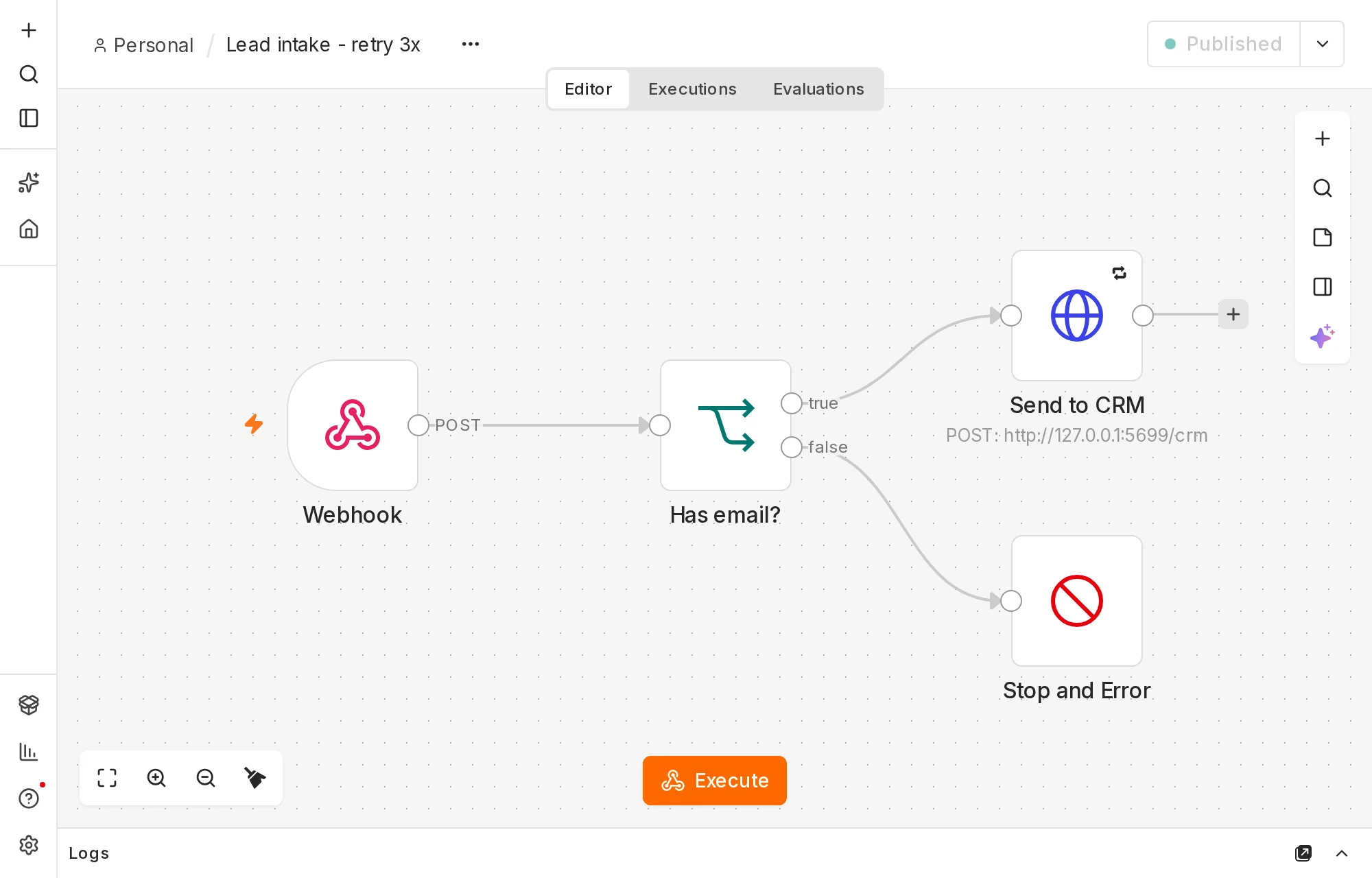
To control the failures, we pointed "Send to CRM" at a small test server of our own that we could switch between working, failing a set number of times, and fully down. Alerts went to a second test address that accepts the same {"text": "..."} message a Slack incoming webhook does, and logged the exact time each one arrived. For a real setup, paste your Slack webhook URL in its place.
The error workflow has three nodes: the Error Trigger, a Code node that limits alerts (optional, covered below), and an HTTP Request that posts the alert.
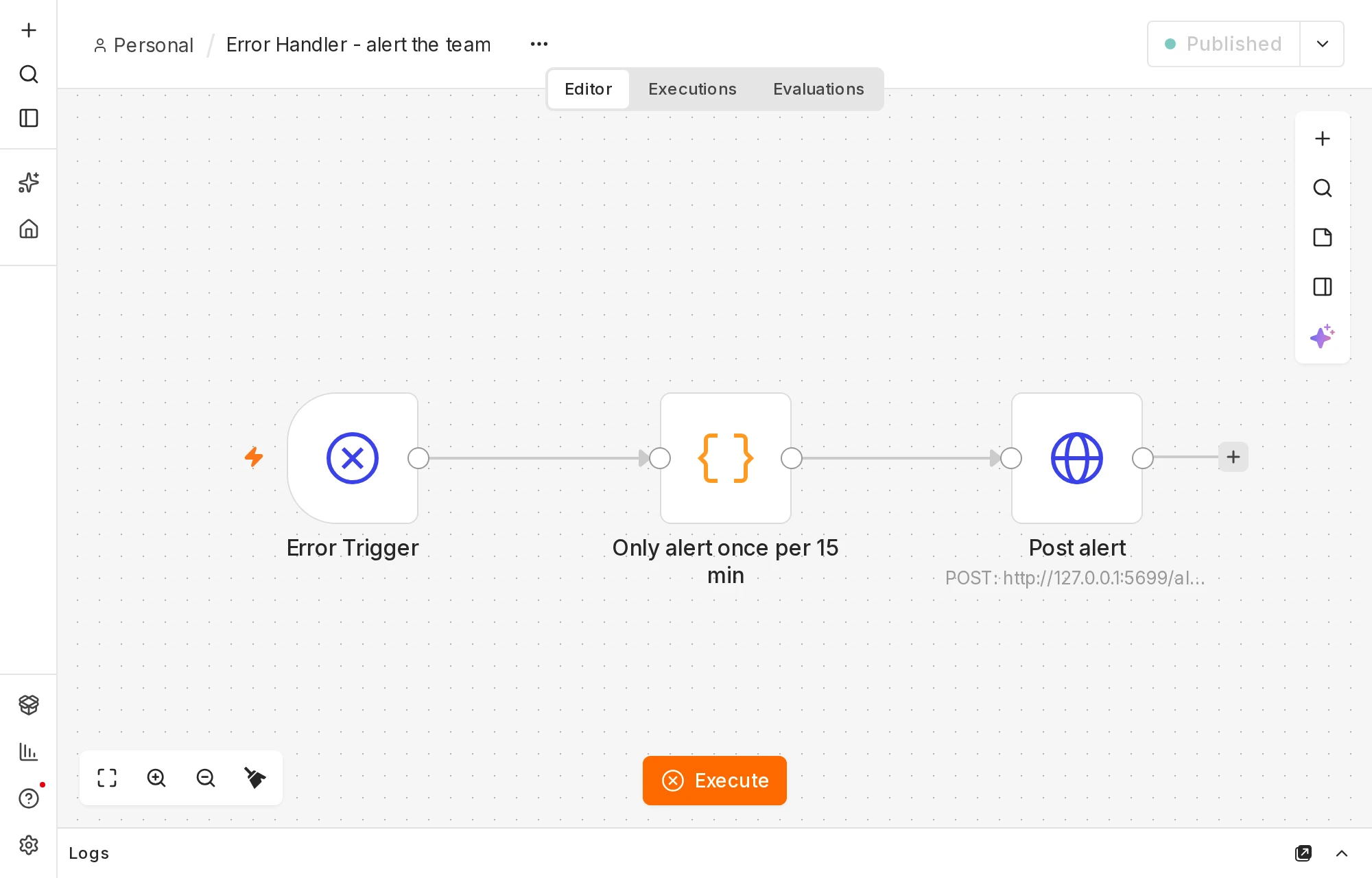
The alert text is one expression in the Post alert node's JSON body:
{{ JSON.stringify({ text: ':rotating_light: ' + $json.workflow.name + ' failed at "' + $json.execution.lastNodeExecuted + '": ' + $json.execution.error.message + "\n" + ($json.execution.url || 'no execution link') }) }}
It names the workflow, the step that failed, the error, and a link straight to the failed run. Here's a real one from our test:
:rotating_light: Lead intake - no retry failed at "Send to CRM": The service was not able to process your request
http://localhost:5678/workflow/JVlueCvx5W18Ctkq/executions/8024
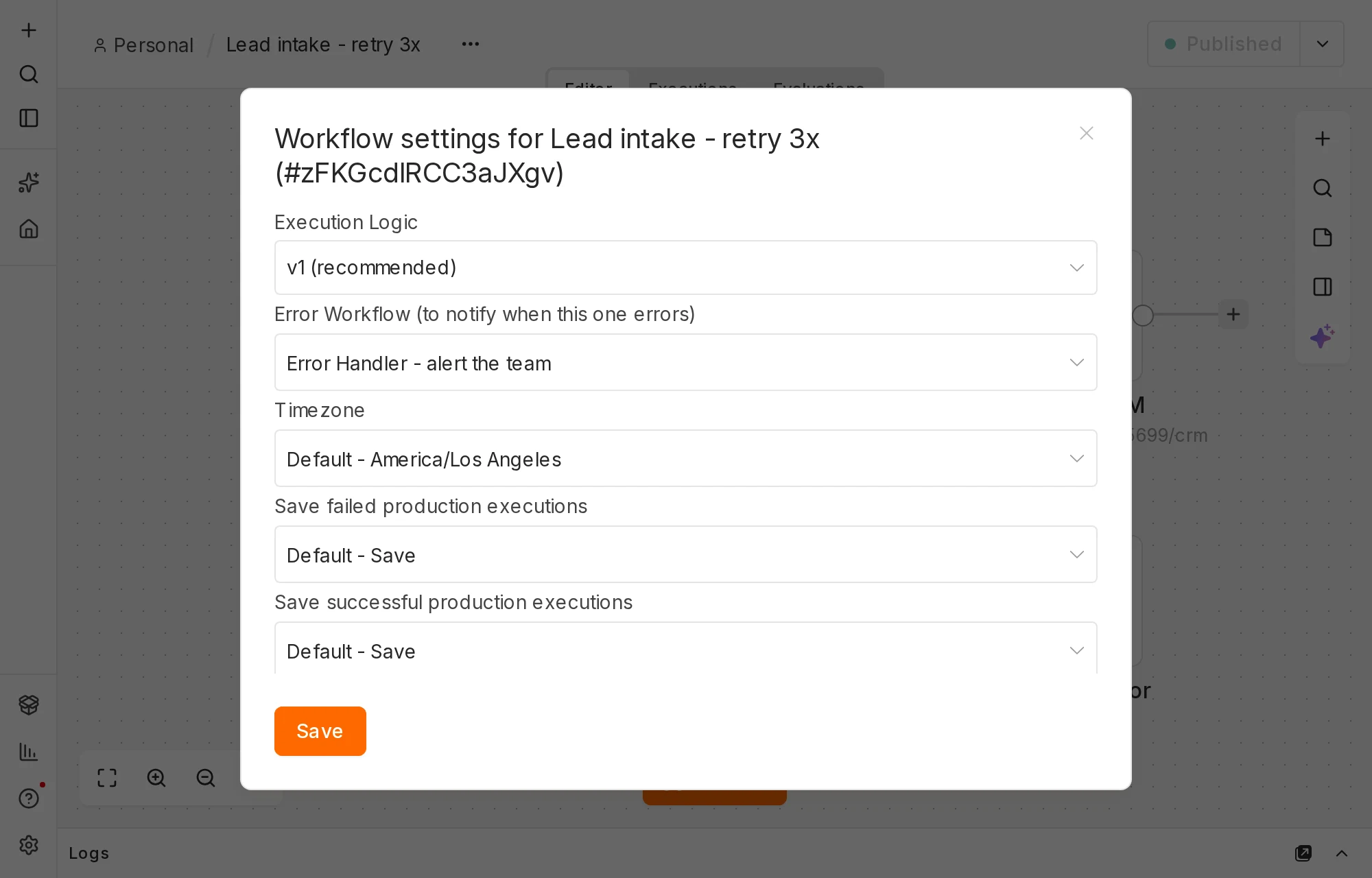
Then we linked the two. In the lead-intake workflow, open the ⋯ menu, choose Settings, and pick the error workflow under Error Workflow (to notify when this one errors).
Test 1: the unpublished error workflow sent nothing
We saved the error workflow but didn't publish it, because n8n's error-handling docs say: "If a workflow uses the Error Trigger node, you don't have to publish the workflow."
Then we ran the full test set. Fourteen runs failed, and no alerts arrived. The failed runs showed up in the Executions list as normal. The only sign of the problem was this line in n8n's server log, once per failure:
Calling Error Workflow for "JVlueCvx5W18Ctkq". Workflow "tY3Ot9VV9mUuWwgQ" is not active and cannot be executed
On n8n Cloud you can't see that log, so the failure would be completely silent. We checked n8n 2.44.6's code to be sure: when it calls an error workflow, it loads the published version, and if there isn't one it logs that line and stops.
The same rule applies to changes. We added the alert limiter, saved it without republishing, and caused three failures. All three alerts came from the old version with no limiter. Edits to an error workflow do nothing until you publish again.
After we clicked publish, every later failure produced an alert.
Test 2: what triggers an alert, and how fast
These are the published-handler results. Times are seconds after our test sent the lead.
| Scenario | CRM calls | Alert | Alert arrived |
|---|---|---|---|
| CRM down, no retry | 1 (failed) | Yes | 0.10 s |
| CRM fails once, no retry | 1 (failed) | Yes | 0.10 s |
| CRM fails twice, retry on (3 tries, 2 s) | 3 (last one worked) | No | |
| CRM down, retry on | 3 (all failed) | Yes | 4.12 s |
| Lead with no email (Stop and Error) | 0 | Yes | 0.10 s |
| Everything working | 1 | No |
Three things stood out.
A single blip loses the lead without Retry On Fail. In the second row the CRM failed once and would have worked a moment later, but the run was already over. n8n's own error message for the 503 said: "Service unavailable - try again later or consider setting this node to retry automatically (in the node settings)."
Max Tries means total attempts. With Max Tries set to 3, n8n called the CRM three times, 2 seconds apart (at 0.03, 2.03 and 4.04 seconds), not one try plus three retries. Retries add delay before an alert, so keep the wait short for anything a customer is waiting on.
Stop and Error gives you a readable alert. The missing-email lead produced: Lead intake - retry 3x failed at "Stop and Error": Lead from Sam Ortiz arrived without an email address. Use it for any case where the data is wrong even though nothing crashed.
Test 3: the form always gets a "success" response
In every one of these runs, including the ones that failed, the Webhook answered the form with HTTP 200 and {"message":"Workflow was started"}. That's the Webhook node's default: it responds as soon as the run starts, before the CRM step happens.
So a website form or Typeform will treat the lead as delivered whatever happens next. The Webhook's Respond setting also offers When Last Node Finishes, which waits for the whole run before answering. We didn't test what the sender receives on a failure in that mode, so check it yourself before relying on it. For most small-business forms, the error alert plus a retry from the Executions list (below) is enough.
Test 4: ten failures, ten alerts
Next we sent 10 leads during a CRM outage. We got 10 alerts within 0.46 seconds. That's tolerable once. If a Slack channel gets 40 alerts every time the CRM has a bad afternoon, people mute it, and then the alert that matters gets missed.
So we added a Code node between the Error Trigger and Post alert. It remembers when it last alerted for each workflow and failing step, and stays quiet for 15 minutes after that:
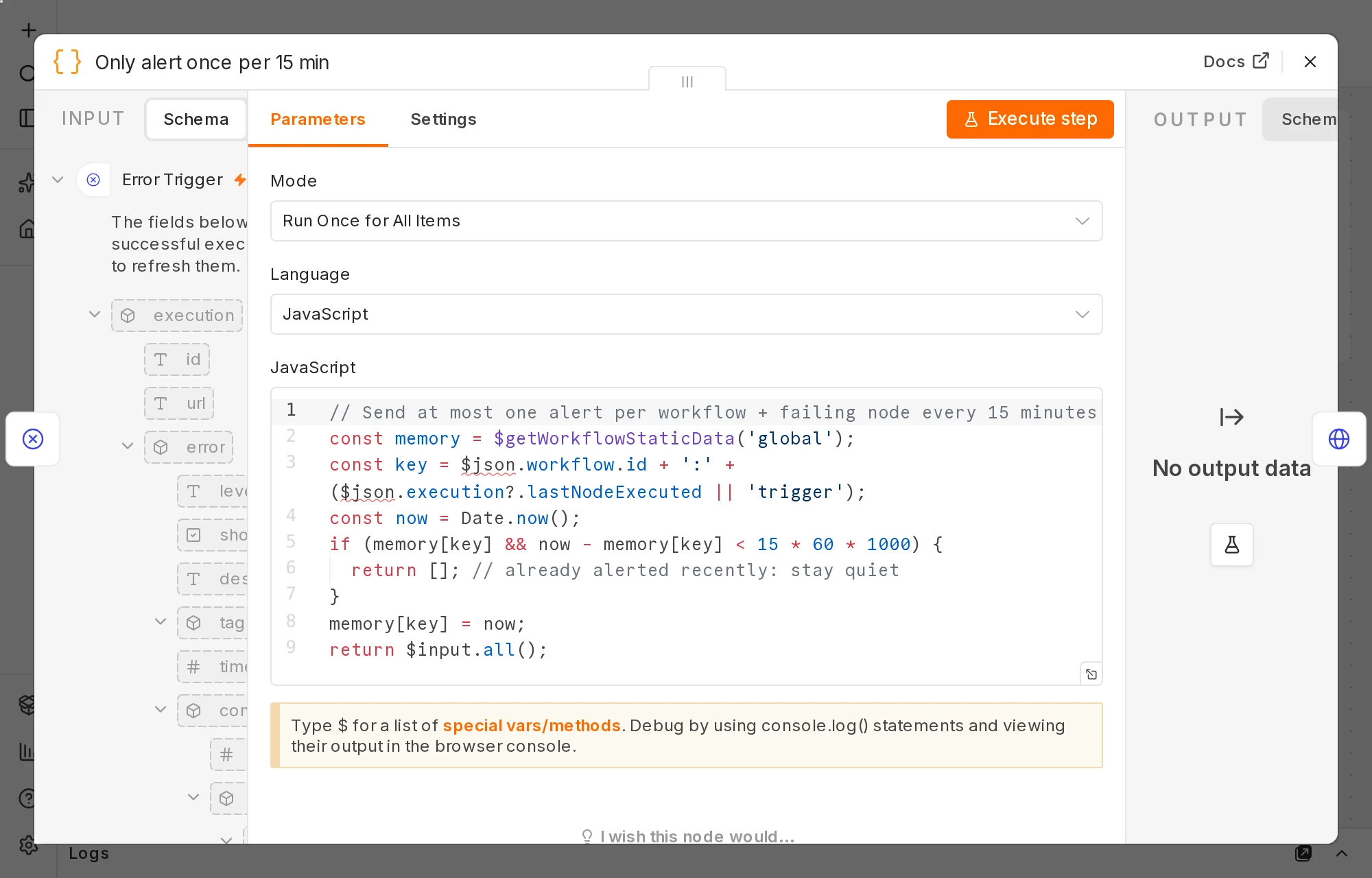
// Send at most one alert per workflow + failing node every 15 minutes
const memory = $getWorkflowStaticData('global');
const key = $json.workflow.id + ':' + ($json.execution?.lastNodeExecuted || 'trigger');
const now = Date.now();
if (memory[key] && now - memory[key] < 15 * 60 * 1000) {
  return []; // already alerted recently: stay quiet
}
memory[key] = now;
return $input.all();
Results after publishing it:
- 10 leads sent at the same moment: 2 alerts, not 1. The first few error runs started before any of them had saved the "already alerted" time, so two got through. It's still a big improvement, but don't expect exactly one.
- 5 more failures, 3 seconds apart, inside the same 15 minutes: 0 alerts. Each one ran the error workflow and stopped at the limiter.
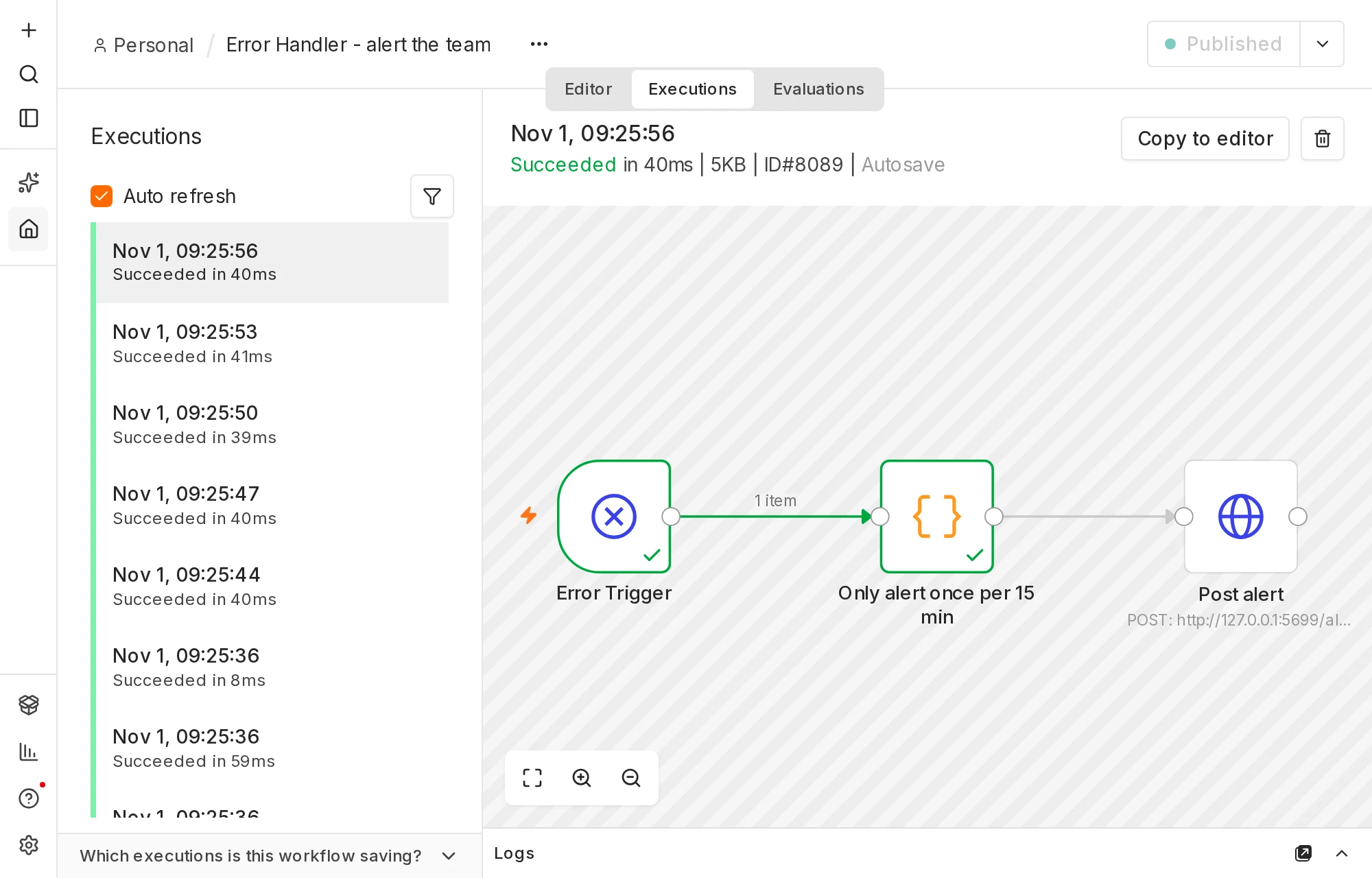
The trade-off is that the limiter hides the second and later failures. When you get an alert, open the workflow's Executions list and look for other failed runs in the same window, rather than assuming it was just one.
Getting the lost lead back
A failed run keeps the data it received, so the lead isn't gone. When the CRM was working again we retried failed run #8024 from the Executions list. It succeeded in 15 ms, the CRM received the lead, and n8n labelled the new run "Retry of execution #8024".
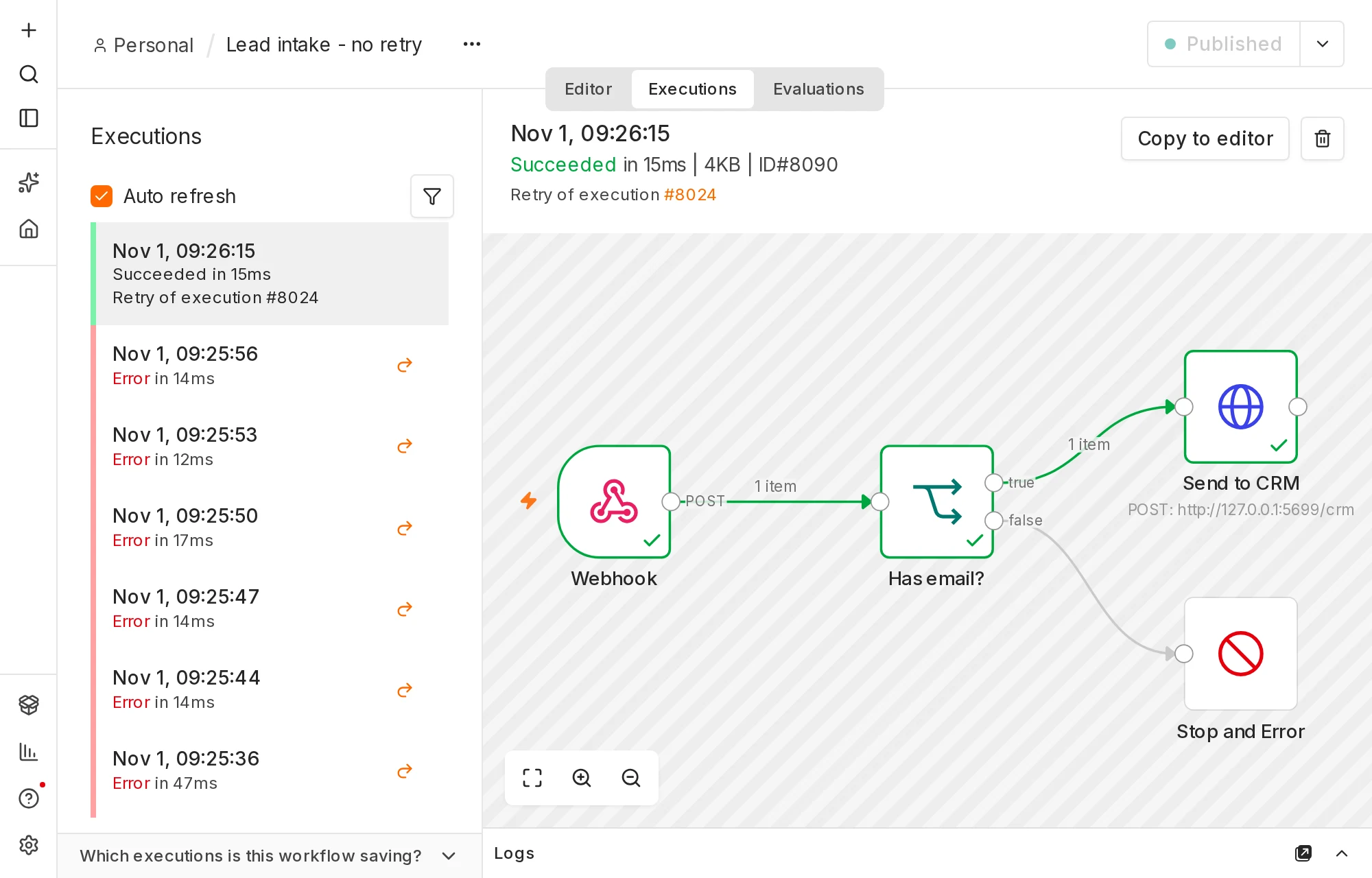
This only works if failed runs are saved. That's the default ("Save failed production executions: Save"), but check it if someone has changed it to save space.
Two more things to check
Fix the link in the alert if you self-host. Our alert links pointed at http://localhost:5678 because our test server didn't have its public address set. In 2.44.6, n8n builds that link from the N8N_EDITOR_BASE_URL setting, and falls back to WEBHOOK_URL. If you self-host, set one of them to the address you open n8n at. (See our self-hosted vs Cloud guide for the rest of the setup.)
Each alert is an execution too. Our error workflow ran 32 times during testing, and each run appeared in its Executions list, including the ones the limiter silenced. n8n's pricing page says Cloud plans are billed on production executions but doesn't say whether error-workflow runs count, and we couldn't test that on a self-hosted server. If you're close to your Cloud plan's limit, keep an eye on your usage page after a busy outage. Our n8n Cloud pricing breakdown has the plan limits.
Also note, from n8n's docs (we didn't test this): the error workflow doesn't run when you click Execute to test a workflow by hand. Only production runs (webhooks, schedules and other triggers) set it off.
How to set it up
- Create a workflow called something like Error Handler. Add an Error Trigger node.
- Add an HTTP Request node: method POST, your Slack incoming-webhook URL, body type JSON, and the expression above as the body. Or skip steps 1–3 and import our template from the box on this page.
- Optional: put the Code limiter between them.
- Publish it. Check the top right says "Published".
- In each workflow you care about, open ⋯ → Settings, choose the handler under Error Workflow, and save. One handler can cover every workflow.
- In each node that calls an outside app (CRM, email, accounting, a spreadsheet), open Settings and turn on Retry On Fail. We used 3 tries with a 2-second wait.
- Test it with a real failure, not the Execute button. We pointed the CRM step at an address that returned an error and sent one lead through the published webhook. Then check the alert arrived and the link opens the failed run.
If you edit the handler later, publish it again and repeat step 7.
Is it worth the setup?
It took us one short workflow and a settings change per workflow. In exchange you choose where alerts go, what they say and how often they come, and one handler covers everything you run. If you're still choosing between automation tools, our Make vs n8n vs Zapier comparison covers the bigger picture.
FAQ
Does n8n email me when a workflow fails? Not on its own in our self-hosted test. Failed runs appeared in the Executions list and nothing was sent until we set up and published an error workflow.
Can one error workflow cover all my workflows? Yes. n8n's docs say you can use the same error workflow for multiple workflows, and the alert includes which workflow failed.
Why didn't my error workflow run? In our testing the cause was that it wasn't published. Other causes from n8n's docs: you ran the failing workflow by hand with Execute, or the failing workflow isn't linked to it in its Settings.
Can I send the alert by email instead of Slack? Yes. Replace the HTTP Request with a Gmail, Outlook or Send Email node and use the same expression parts for the subject and body. We tested only the webhook version.
Does The Automated Shop earn a commission from n8n? Not at the moment. Links go to the official sites with no referral tag. If that changes we'll say so on the page. See our affiliate disclosure.