Pricing
Kit Pricing Explained (2026): What the Free Plan Actually Blocks
Some links below are affiliate links. If you buy through them we may earn a commission at no extra cost to you. How we make money.
Prices checked October 25, 2026 (US dollars, before tax) from kit.com/pricing, beehiiv.com/pricing and mailchimp.com/pricing with its plan comparison. Plan rules come from Kit's help center: The Kit Free plan and Billing at Kit. Kit's 25% Pro offer ends November 7, 2026. Prices change; check the live pages before you buy.
Kit (formerly ConvertKit) gives you a free list of up to 10,000 subscribers. beehiiv's free plan stops at 2,500 and Mailchimp's at 250. The catch is what Free doesn't do. Kit won't send an automatic welcome email or run a sequence, and it won't let Make, Zapier or webhooks connect to it. So the most common small-business setup, "someone signs up, they get a welcome email", needs a paid plan.
We run our own newsletter on Kit Free, so on October 25 we went through the account and clicked every feature that wanted money, submitted our own signup form with a test address, and priced the upgrade against beehiiv and Mailchimp at four list sizes.
Short version:
- If you only send a newsletter by hand, stay on Kit Free. It costs $0 up to 10,000 confirmed subscribers, and you get broadcasts, forms, landing pages and API access.
- To send a welcome email automatically, you need Creator. That's $39 a month, or $390 a year, for up to 1,000 subscribers. Sequences, visual automations, the Zapier app, Make's Kit app and outgoing webhooks are all locked on Free.
- The cheapest automatic welcome email is beehiiv Free. It includes one welcome email for lists up to 2,500. Anything more than that one email needs beehiiv Lite at $59 a month.
- Mailchimp is cheapest on monthly billing ($26.50 at 1,000 contacts) but limits Essentials to 4-step flows and counts unsubscribed contacts toward your bill. Pay Kit yearly and the gap mostly closes: at 1,000 subscribers it's $390 a year vs $318 for Mailchimp, and at 5,000 Kit is slightly cheaper ($890 vs $900).
- Most small businesses don't need Pro. Pay for it if more than two people need to log in or you want deliverability reports. If you're buying Pro, the first-year discount (1,000 subscribers: $593 instead of $790) ends November 7.
Kit's plans on October 25, 2026
Free is $0 for up to 10,000 subscribers, with one login. The paid plans:
| Subscribers | Creator monthly | Creator yearly | Pro monthly | Pro yearly | Pro first year (offer) |
|---|---|---|---|---|---|
| Up to 1,000 | $39 | $390 | $79 | $790 | $593 |
| 1,001–3,000 | $59 | $590 | $99 | $990 | $743 |
| 3,001–5,000 | $89 | $890 | $139 | $1,390 | $1,043 |
| 8,001–10,000 | $139 | $1,390 | $189 | $1,890 | $1,418 |
| 10,001–15,000 | $169 | $1,690 | $249 | $2,490 | Not checked |
| 20,001–25,000 | $199 | $1,990 | $279 | $2,790 | $2,093 |
| Logins | 2 | 2 | Unlimited | Unlimited | Unlimited |
Source: kit.com/pricing, checked October 25, 2026, with the subscriber slider set to each tier on both monthly and yearly billing. We didn't screenshot the 10,001–15,000 tier; its monthly prices come from the page's price table, and the yearly figures follow Kit's stated rule that a year costs the same as 10 months. "First year" prices are the 25% Pro annual offer, which Kit says ends November 7, 2026 and renews at the standard yearly rate. Kit's help center calls Pro "Creator Pro".
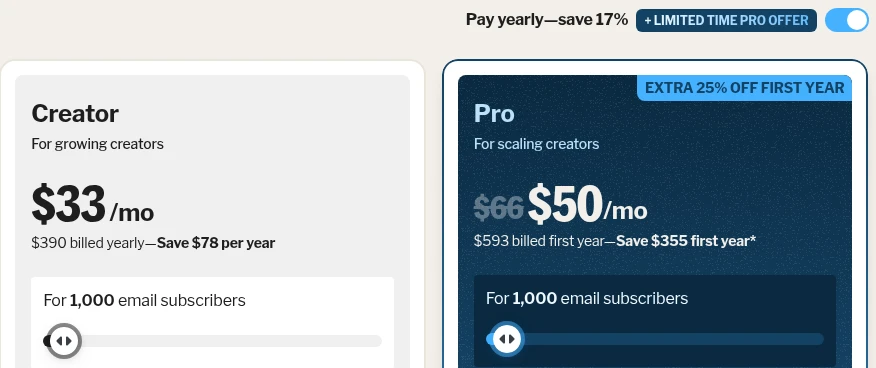
Kit charges for confirmed subscribers only. Its billing help page says unconfirmed, unsubscribed, bounced, complained and blocked subscribers don't count, and that subscribers who have gone cold still do. On a paid plan, Kit moves you up a tier automatically when your list grows. You pay the next tier's price and there's no overage fee. Kit doesn't move you back down when the list shrinks. Kit's help center says to use "Switch to a lower tier" in your billing settings; its pricing FAQ still says to email [email protected]. Either way, it's on you.
Watch the 10,000 cliff on Free. Kit's Free plan article says that once you go over 10,000 subscribers, "You'll need to upgrade to a paid plan to keep sending." At 10,001 subscribers the cheapest plan is Creator in the 10,001–15,000 tier: $169 a month or $1,690 a year. You go from paying nothing to paying that in one signup, so prune bounced and inactive addresses before you reach it.
If you've read reviews that quote lower Kit prices, check their date. Kit called its October 2025 change its "first price increase in 12 years"; existing customers moved to the new prices on their first billing cycle after October 15, 2025.
What Kit Free blocks: we clicked every lock
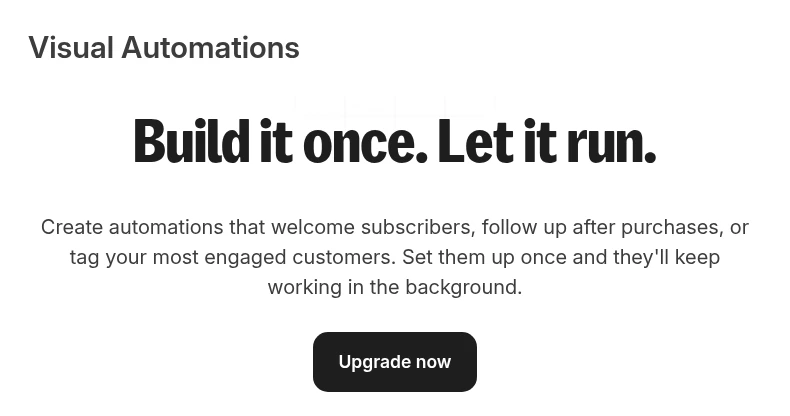
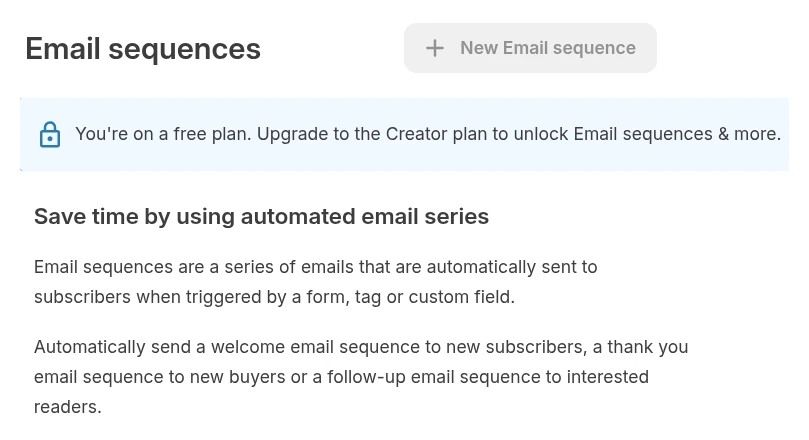
All of these screenshots come from our own Kit account on the Free plan, taken October 25, 2026.
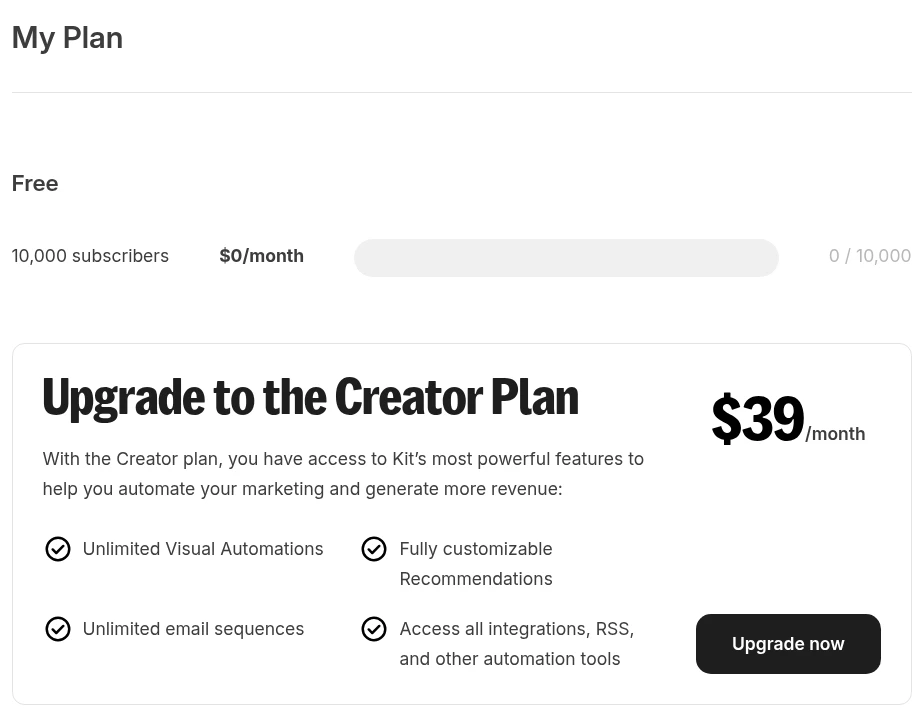
Visual automations: locked. The Automations page is an upgrade screen. Kit's own wording on that screen is "Create automations that welcome subscribers", which tells you where the welcome email lives.
Email sequences: locked. The "New Email sequence" button is greyed out and the banner says to upgrade to Creator.
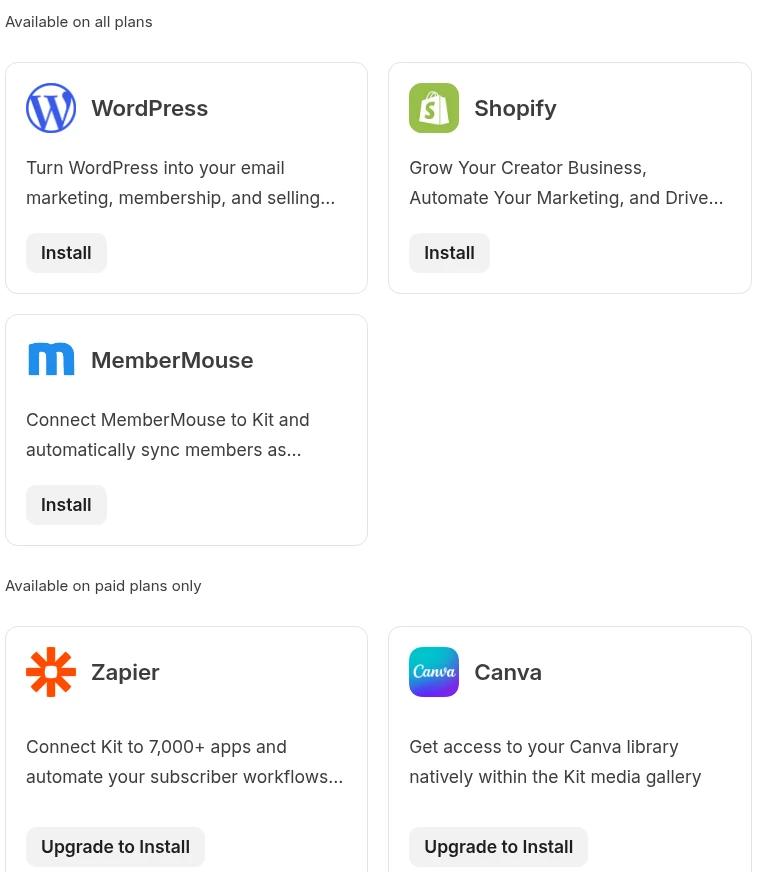
Zapier and most app connections: locked. Kit's App Store splits apps into two groups. WordPress, Shopify, WooCommerce, WPForms and MemberMouse are "Available on all plans". Zapier, Canva, GIPHY, Add-to-Calendar, Calendly, Typeform, Linktree and Pinterest say "Upgrade to Install".
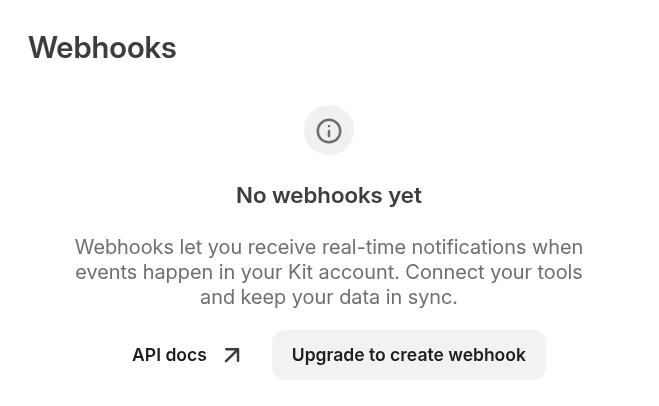
Outgoing webhooks: locked. Webhooks let Kit tell another tool "someone just subscribed". On Free the only button is "Upgrade to create webhook".
Make: needs a paid Kit account. Make's own documentation for its Kit app says, "To use the Kit app in Make, you must have a paid Kit account" (apps.make.com/convertkit, checked October 25). Kit's Free plan article does list API access, so a developer could call Kit's API from n8n or Make's generic HTTP module. We haven't tested that, and it still wouldn't give you a sequence to add people to.
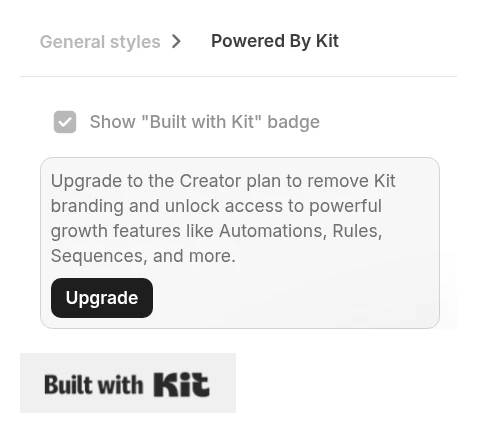
"Built with Kit" branding: stays on. In the form designer, the badge checkbox is ticked and greyed out until you upgrade. The badge also appeared in the footer of our confirmation email.
Kit's Free plan article lists the rest of what's paid-only: rules, RSS campaigns, AI connectors, paid apps, and earning from paid recommendations. On the pricing page, Subscriber Signals, engagement scoring and deliverability reporting are Pro-only. If you downgrade from a paid plan, Kit says your automations and sequences stop running.
What a signup looks like on Free
At 9:17 AM PT on October 25 we signed up to our own newsletter from the form on this site with a test address. The form answered "Thanks! Check your inbox to confirm." Kit's "Important: confirm your subscription" email reached the test inbox at 9:17:01 AM PT, in the same minute, sent from our hello@ address and carrying our mailing address and the "Built with Kit" badge.
That confirmation email is the only thing our Free account sends automatically. There's nothing after it. We didn't click the confirmation link, so the test address stayed unconfirmed and doesn't count toward our subscriber total. Kit doesn't bill for unconfirmed subscribers.
If you'd planned to send people a discount code, booking link or price list the moment they sign up, Free can't do that. Your options are to send it by hand in your next broadcast or upgrade.
Kit vs beehiiv vs Mailchimp: what an automatic welcome email costs
All three have a free plan, but they draw the line in different places:
| Free plan | Kit Free | beehiiv Free | Mailchimp Free |
|---|---|---|---|
| Subscriber limit | 10,000 | 2,500 | 250 contacts |
| Sends | Unlimited broadcasts | Unlimited | 500 a month |
| Logins | 1 | 1 | 1 |
| Automatic welcome email | No | Yes, one welcome email | No (flows "not included") |
| Multi-step automations | No | No (from Lite) | No |
| Zapier / Make / webhooks | No (paid plans only) | Webhooks from Lite | 300+ integrations on Free |
| Remove the provider's branding | Creator | Pro only | Essentials |
Sources: kit.com/pricing, Kit Free plan help, beehiiv.com/pricing, Mailchimp plan comparison, all checked October 25, 2026.
Once you need more than one automatic email, these are the cheapest plans on each service that run multi-step automations:
| Subscribers | Kit Creator | beehiiv Lite | Mailchimp Essentials | Mailchimp Standard |
|---|---|---|---|---|
| Monthly billing | ||||
| 1,000 | $39 | $59 | $26.50 | $45 |
| 2,500 | $59 | $79 | $45 | $60 |
| 5,000 | $89 | $109 | $75 | $100 |
| 10,000 | $139 | $139 | $110 | $135 |
| Yearly billing (total for the year) | ||||
| 1,000 | $390 | $588 | $318 (monthly × 12) | $540 (monthly × 12) |
| 2,500 | $590 | $828 | $540 (monthly × 12) | $720 (monthly × 12) |
| 5,000 | $890 | $1,140 | $900 (monthly × 12) | $1,200 (monthly × 12) |
| 10,000 | $1,390 | $1,428 | $1,320 (monthly × 12) | $1,620 (monthly × 12) |
Sources: list prices on kit.com/pricing, beehiiv.com/pricing and Mailchimp's pricing data, checked October 25, 2026. Mailchimp's tiers are 500, 1,500, 2,500, 5,000 and 10,000 contacts, so 1,000 contacts is priced at the 1,500 tier. Mailchimp doesn't publish yearly prices below 10,000 contacts (it offers yearly Standard and Premium plans from 10,000 through sales), so its yearly column is 12 monthly payments. beehiiv shows yearly prices as a monthly figure ($49 a month at 1,000 subscribers); we multiplied by 12. Mailchimp was also showing a "save 15% on 10,000+ contacts" offer we've left out.
Three things the table doesn't show:
- Mailchimp Essentials is the cheapest, but its flows stop at 4 steps. That's enough for a welcome email plus a couple of follow-ups. Standard allows up to 200 flows.
- Mailchimp counts people who unsubscribed. Its contacts help page says unsubscribed contacts count toward your monthly limit. Kit doesn't bill for them. If a lot of your list has unsubscribed, Mailchimp's real price is a tier or two higher than your active list suggests.
- beehiiv Lite has limits Kit Creator doesn't. It allows 10 live custom automations and 3 webhooks, and you need Pro ($109 a month at 1,000 subscribers) to remove beehiiv's branding. Kit Creator removes branding and has no cap on automations or sequences.
Kit Creator vs Pro
Creator has everything a small business needs to welcome and follow up with subscribers: unlimited visual automations and sequences, RSS, the paid apps and integrations, and no Kit branding. Pro costs $40 a month more at 1,000 subscribers ($79 vs $39) and adds:
- unlimited logins (Creator has 2)
- Subscriber Signals, engagement scoring and deliverability reporting
If the owner and one employee are the only people who log in, stick with Creator. If you're paying for Pro anyway, the 25% first-year offer saves $197 at 1,000 subscribers ($593 vs $790) and $472 at 10,000 ($1,418 vs $1,890). It's for yearly billing only, ends November 7, 2026, and renews at the full price.
Connecting Kit to your automation tool
The usual small-business flow, "lead comes in from a form or CRM, add them to the list, send a welcome email", needs two paid plans if the lead doesn't come in through a Kit form: Kit Creator for the welcome sequence and the connection, and a plan on the automation tool.
- Make: the Kit app has modules to add a subscriber to a form or sequence, add tags, and watch for new form subscriptions. It needs a paid Kit account. Make's own prices are in our Make pricing guide (Core was $9 a month billed yearly when we checked on October 16).
- Zapier: listed in Kit's app store as paid plans only. See our Zapier pricing guide for what a Zap costs to run.
- n8n: reaches Kit through its API. See n8n Cloud pricing or self-hosting n8n for the cost.
If your signups come straight from a Kit form on your site, you don't need an automation tool at all. A Creator sequence triggered by the form does the job. Our Make vs n8n vs Zapier comparison covers when it's worth adding one.
Which one fits your business
- You send a monthly newsletter by hand and want room to grow: Kit Free. No other free plan we checked holds 10,000 subscribers.
- You want one automatic welcome email and have fewer than 2,500 subscribers: beehiiv's free plan does it for $0, with beehiiv branding.
- You want a short welcome series and have up to about 2,500 contacts, few of them unsubscribed: Mailchimp Essentials is the cheapest on monthly billing ($26.50 at 1,000 contacts), if four steps is enough.
- You want welcome sequences, a Make or Zapier connection, and no branding, and you'll pay yearly: Kit Creator. $390 a year at 1,000 subscribers. At 5,000 it's $890, less than Mailchimp Essentials over a year.
- Three or more people need to log in: Kit Pro, and buy before November 7 if you want the first-year discount.
Our pick: stay on Kit Free until you need an automatic email or a connection to your other tools. When you do, Kit Creator on yearly billing is the one we'd buy. You pay for confirmed subscribers only, you can run as many automations and sequences as you like, and Make and Zapier both work with it. Start Creator's 14-day trial (no card needed) and build the welcome sequence before you pay, so you know it does what you need.
FAQ
Is Kit's free plan really free? Yes. $0 for up to 10,000 confirmed subscribers, with unlimited broadcasts, forms and landing pages. You get one login, Kit's branding on forms and emails, and email support that Kit says answers within 24 hours.
Can Kit Free send a welcome email? Not automatically. It sends the double opt-in confirmation email (ours arrived within the same minute), but sequences and automations need Creator.
Does Kit Free work with Zapier or Make? No. Zapier is under "Available on paid plans only" in Kit's app store, and Make says its Kit app needs a paid Kit account. Outgoing webhooks are locked too.
Do unsubscribed or unconfirmed people count toward my Kit bill? No. Kit counts confirmed subscribers, including inactive ones. Unconfirmed, unsubscribed, bounced, complained and blocked subscribers don't count.
What happens if I go over 10,000 subscribers on Free? Kit says you'll need to upgrade to keep sending. At 10,001 subscribers, Creator costs $169 a month or $1,690 a year.
Is yearly billing worth it? If you're confident you'll stay, yes. Kit's yearly price is 10 times the monthly price, so you get 2 months free. Kit's billing page says refunds are available within 30 days of your first payment.
Does The Automated Shop earn a commission if I sign up for Kit, beehiiv or Mailchimp? Not at the moment. Links on this page go to the official sites with no referral tag. If that changes we'll say so on the page. See our affiliate disclosure.